


Adding Bleed to a Document


SN wrote:
How do you put in bleeds after you have created and saved an InDesign file?
I have three things to say about this.
First, for anyone who doesn’t know, a bleed is a way to get something to print to the edge of the page. You extend an object off the page (past the page boundaries), then print it with trim marks (also called crop marks), then the output provider (bindery or printer or whatever) cuts the edges of the page at those trim marks. The result is some wasted paper, but the colors/images “bleed off” the page.
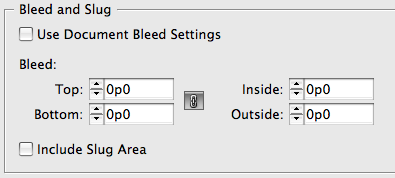
Second, InDesign offers bleed guides on the pasteboard. To add a bleed guide in the New Document dialog box, click More Options to see the Bleed and Slug guide options. About 1p (or .125 in, or 3 mm) is a reasonable amount to type in. If you have already created your document, you can get the same bleed guides by choosing File > Document Setup, then clicking the More Options button. Once you have bleed guides, you can easily “snap” objects to them so you’re sure they’re bleeding far enough off the page.
Finally, you do not need bleed guides to make objects bleed. You can just eyeball it, extending objects on to the pasteboard. Guides are just guides!
Ultimately, the most important thing to keep in mind when making bleeds is not whether there are guides there, but what you choose in the Marks and Bleed pane of the Print or Export PDF dialog box. If you do have bleed guides set up, you can skip filling in the Bleed fields by simply clicking the Use Document Bleed Settings checkbox. But if you didn’t make bleed guides, it’s no problem — just leave the checkbox off and type in some bleed values yourself. If you leave them set to zero, InDesign will trim the page at the page edge, so you’ll get no bleed at all, even if the objects are bleeding to the pasteboard:
 |
As we French like to say, “It goes without saying, but it goes better when you say it.” Nice recap, David.
For people who don’t know what bleed is for, Sandee Cohen did a great job explaining the reasons it is needed in her podcast “From Design into Print”, episode 4 (I believe).
Q.
Most printers I have worked with use 1/4″ (0.25″) or 1/8″ (0.125″) for documents. Cover specs vary depending on the press and it is always best to get template specs for those before you start building the file. This is especially true with hard cover books that have a wrap, spines, boards and joints.
1/8″ is roughly 3mm, Jerome.
1/4″ seems a bit extreme.
I think for bleed they were talking explicity about the body and normal covers, however, on harback covers it’s common to put 20mm bleed for the wrap around, at least for all the hard back covers I’ve done that’s been the norm.
Always wise to talk with the printers before commencing any project where you’re not sure and get their specs and requirements.
The question about bleed and margins etc. always come up. Perhaps they can be covered in a podcast or videocast?
As a prepress guy, I must stress that designers need to learn what bleeds are and when to use them! InDesign makes it so simple to set values for bleeds and to turn them on and off.
My shop likes .125″ bleeds, but things that die-cut usually need .25″ bleeds.
Yes, some paper is wasted, but it will be wasted regardless. Very rarely do we not have to trim something after it is printed. Adding bleeds means that a paper cutter has some wiggle room.
If you don’t add bleeds, someone will have to in prepress, by dragging out your solid shapes or doing surgery on your photos. Save us this headache and add bleeds.
Eugene,
1/4″ is extreme but I have had a number of printers request it. I have also had printers request different bleed for top, bottom, and left/right bleeds when working on covers. If I don’t have the specs up front in the design process I like to use 1/4″ bleed for interior pages and 1/2″ for covers just to be sure, you don’t have to use all of it. It’s better to have the the extra there than to have fake it or clone it in after everything is designed.
And as for the metric, I used it when I was working for NATO in Italy, but that was quite a while ago and I have not used metric measures since. When designing I typically use points and picas.
and choose a good printer – I don’t have much joy discussing belled with kinkos. LOL
I always ask for 4 to 5mm of bleed and crop marks as I usually have to place the PDFs in InDesign to tile them prior to printing ? we do small runs on a simple Canon copy-printer comparable to Xerox’ 240 for those interested. Once placed I can then remove some of the bleed when necessary by simply changing the placed PDF’s frame size.
The big bugger though is that a lot of folks who actually use Adobe software and believe they know what they’re doing ? as opposed to the larger group who think Word, Excel, PowerPoint and *shoot me please* Publisher are perfect for making posters, business cards and the like ? still refuse to set up bleeds entirely, or they make bleeds the size they want, resulting in me having to call them for new files every single time.
We use a 5mm bleed on everything. This may seem a bit excessive but we never know if a job might be shrunk down and re-printed at a reduced size at a later date, at which time a standard 3mm bleed may well have shrivelled away to nothingness.
We use a 5mm bleed on everything. This may seem a bit excessive but we never know if a job might be shrunk down and re-printed at a reduced size at a later date, at which time a standard 3mm bleed may well have shrivelled away to nothingness.
I’ve always used 3mm in general, though some places I’ve known use 4mm.
I always use 5mm bleed in Photoshop, to allow plenty of room for the edge of the document affecting layer styles (for example, angled drop shadows will visibly stop at the edge of the document, unless the image extends beyond the edge of the document). This is only for full-page images that bleed off the edge, obviously.
Thanks a lot for then information
Please help me , how do I add bleed around an object in Indesign on a page, like having a shape with a cutcout and bleed around that? can you help?
hello there,
Im designing a magazine with perfect bound, and spine, I need to have bleed inside as will be rduced in binding, I always used 5mm for bleed on everything, but I see that works different and i need another bleed foe inside sth like gutter to give me extra space for inside pages as cover, its 100 facing pages magazine. help plz
@aida: Check with your printer, but in a perfect bind you usually do not need to bleed into the gutter — just to the spine. But in a spiral bind (where the pages are actually cut apart), you may need to bleed into the gutter. We talked about how to do that here, and Cari mentions it here, too.
Your description of how to set up a bleed in InDesign is probably the clearest instruction I have read anywhere about how to do anything. Thank you. I will now bookmark your site.
People have a very hard time communicating how to do something. The absolute worst is the forum approach, and when a query takes me to such a forum, I almost always just close the window, because it is guaranteed to be useless (in part because of illiteracy).
Not so here!
Thnx dude!
I know my question at the end not is 100% related to bleed but my post is not completly off topic since my problem includes bleed and bleed trimming.
Challenge: Create a letter sized saddle stitched full bleed booklet that have to be printed on SRA3. Actually it is a booklet intended for the US but we need to use our local (Swedish) paper size.
A3 (297 x 420 mm or 11.69 x 16.53″) is the European equivalent to US 11 x 17″. SRA3 (320 x 450 mm or 12.59 x 17.71) is oversize A3 which can be compared with 12 x 18″ when designing full bleed 11 x 17″ publications.
My solution: I set up page size to 215.9 x 279.4 mm (8.5 x 11”). I set bleed to 3 mm on all sides. I set top and bottom slug to 20,3 mm and in- and outside slug to 9,1 mm. That way I will get sheets 320 mm high (as intended) and 234,1 mm wide. The latter may seem odd since 2 x 234,1 makes 468,2 mm which is exactly 18,2 mm more than the 450 mm long sheet I mentioned in the beginning. I tried adding slug just to the outside edges but since InDesign still will add printer marks all around I might just get in control of how much space that will be added on all sides including the inside.
The reason I do this is that InDesign no longer has the possibility to create booklets. It can print booklets but create and save them.
From my InDesign document I create a PDF file. Then I use Quite Imposing for trimming and imposing in to bookets.
First I trim off 9,1 mm from the left side of all odd pages, then 9,1 mm from the right side of all even pages. Finally I use the create booklet command ending up with a sheet sized SRA3 with a design sized 11 x 17″ on it.
If my publication contains lots of pages, I also compensate for creep.
It was lot easier earlier when InDesign could create and save booklets.
And finally the question – Can anyone suggest an easier way of doing this? I have tried to do this in several different ways but always ending up as described above.
Btw, please tell me where to post my question if this is completely wrong.
@Dag: The forum is probably a better place to post questions like this (click Forums at the top; you will need a free membership to post). However, it seems like it would be easier to create a Facing Pages document (a document that has a left and right page). Then the bleed is only on the outside.
I agree that it is better to use Acrobat to do the imposition, which was also discussed here: https://creativepro.com/topic/printing-booklet-ok-but-how-to-print-a-book-file-in-booklet-form
Printer-wise, esp with the one I’m using, a 3mm-5mm is quite enough.
Sorry if this is a stupid question, but I’ve done the above with a 1/8″ bleed and when I set to print the PDF actual size, it’s still printing with the white box around it with the image not bleeding off the page?
My student has an InDesign file in which bleeds seem to be set properly, however when he views in Preview, the bleed does not clip away visually as usual. I set up a sample doc on the same work station and the problem persists. I set up a sample doc on a different computer and all seems normal, so it would seem to be an issue with either the computer or a setting that my student hit or set unintentionally. Any ideas?
Nancy: Instead of writing the answer here, I wrote it up so that more people could see the answer: https://creativepro.com/preview-show-bleed.php
Could you also expand the article a bit and explain what the “inside” and “outside” bleed are (with regards to a double page spread)?
I ask as a poster on this forum – https://www.graphicdesignforum.com/forum/forum/software/adobe-products/1526590-double-page-spread-setup?p=1526630#post1526630 – offered a tip on how to use the “inside” bleed. Perhaps you can explain it better, as I didn’t fully grasp the concept the poster was trying to explain?
(Thanks for a great resource).
Is it ok, to set up a page,in indesign, say a jpg. file 154mm width by 216mm height, same colour as the main page and place it in the background of your A5 page, (148mmx210)is this a way to be sure to get a 3mm bleed?
Hi there,
No matter what I do – I can’t seem to make the bleed guides show up in my document, no matter what mode I’m in. My other guides are showing just fine …did I turn the bleed marks off somewhere?
Thanks in advance!
a.
This is hard to set by mistake but have a look at the preferences under Guides & Pasteboard to see if the Bleed color is not set to white, that would pretty much make them invisible.
Thanks for the suggestions – just checked it’s set in red. Are there any views that would still show the margins and all other guides but hide the bleed?
Have you tried exporting your document to IDML and reopening it, this usually clears up strange anomalies. Otherwise I can’t seem to reproduce the effect at my end.
Instructions on how to get to the Bleed & Slug dialog box shown in your example would be nice.
Thank you for preventing a lot of drama in my office!
I added a bleed midway through a job and saved it. Went back and found that all my pages were blank, with a red bleed line. How do I get my 140 pages back?!