


Assigning Default Text Formatting


FS wrote:
I always use the import options dialog box to remove all formatting from the imported text. And when I import the text into a frame, it applies a paragraph style. But, what if I want it to apply a specific paragraph style of my choice by default? How do I set it for that?
This is a good example of something that should be really simple and straightforward but isn’t in InDesign. For example, if you make a text frame, click on a paragraph style, and then import text (stripping away all the paragraph styles in the original file, as you mentioned), you’d think the text would be formatted with the paragraph style you chose, right? Unfortunately not. Here’s one workaround: Choose the paragraph style you want before you create or select the frame — that is, choose it when nothing is selected on your page. Now when you import the text, you should get the style you want.
This works because choosing any style or formatting while nothing is selected on your page sets the default text formatting state for this document. InDesign saves this default text formatting with the document so you can even save the file, close it, open it a week later, make a new text frame and start typing and you’ll get the formatting you chose. This is both frustrating (if you don’t know what’s going on) and wonderful (if you do).
Here’s another way to pick the paragraph style you’ll get when you import a file or start typing new text in a frame:
- In the Object Styles palette, right-click (or Control-click on the Mac with a one-button mouse) on the [Basic Text Frame] object style and choose Edit from the context menu.
- Click on Paragraph Styles in the list of panels along the left side of the Object Style Options dialog box. (This both turns on the checkbox and displays that panel.)
- Choose the desired paragraph style from the Paragraph Style popup menu and click OK.
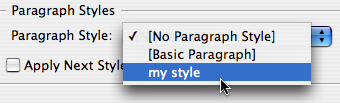
- When you create a text frame or import text, make sure the [Basic Text Frame] style is selected in the Object Styles palette (it should be by default whenever the Type tool is selected).
Of course, you could the same technique with another object style instead. The key is that you can apply a paragraph style to an object style, which is a good thing.
For more information, see Pariah’s post on defaults.
 |
There is a 3rd way for importing into a specific paragraph style: Choose the box you want, choose the paragraph style you want, type a blank (or any other character), import the text, delete the first character (or blank) at the beginning.
Thank you David so much! You are right about it being something that should be simple but isn’t.
The “help” section mentioned that you could change the default text but didn’t say HOW.
I created a newsletter for our trade org and everytime I open it I get a msg that the font Times is not found. (well, that’s because I don’t have Times on my computer!) I don’t know how the default font became Times in the first place, but I can’t seem to get rid of the message.
Help!
RT
Close all documents and change your font to one on your computer (this changes your default font).
[…] with the answer: On January 1, 2007, at 6:14 p.m., David posted the (still relevant) article “Assigning Default Text Formatting.” Great work, Salah! You will receive a copy of In-Tools’ wonderful Style Utilities for […]
InDesign is the most frustrating application sometimes. I wanted to change text coming in in a certain style ? which was white every time I pasted it in to a new text box ? so I changed the Paragraph Style in the [Basic Text Frame] and thought to myself, how cool is that?
Then went on with my work happily until I noticed in hundred of text frames in the document the style had changed to the style I’d just chosen in the [Basic Text Frame]!!!!!
Beware, don’t perform this on an old document you’ve been working with for a while. You might get a nasty surprise.
I’ve just done more command-Z’s than I’ve ever done in my entire life!
I’m importing an Xml into frame that have an ObjectStyle assigned. This ObjectStyle applies Parragraph style and next.
My Xml has only caracter styles labeled.
Why when I import the Xml it doesn’t applies the parragraphStyles and next to my text?
In other words:: does the ObjectStyle works correctly when you import Xml?
Thanks
Your blog post, “Assigning Default Text
Formatting | InDesignSecrets” was worth writing a comment on!
Simply just wished to say you did a remarkable job.
Thanks a lot ,Sharron
Exactly what I was looking for, and worked like a charm.
ID was always aligning my text and signs etc. to the right, which made no sense at all, but your short tutorial helped me fix it.
Cheers!
Timo
Hello!
I have a question. I have converted a quark file into an indesign file. I had to ajust the styles so I did, and defined the language as English UK. That went fine. Then I converted a different quark file into an indesing file and loaded the styles a had fixed in the previous one. My styles are correct but for some reason I have Canadian english and American English. How is that possible?!?!? I know I can find/change but I was wondering if I’m doing something wrong? Ideas anyone?