


Case sensitive spell checks


A few weeks ago I wrote a post about how to create and add a custom InDesign dictionary (containing all of your company’s jargon and product names, for example) and share it with your co-workers. Work is sped up because InDesign (or InCopy) doesn’t keep flagging your company’s words as being misspelled, and increases accuracy because everyone’s copy of InDesign is pulling the from the same custom dictionary with the same correct spellings.
I was showing this technique to a client, a publisher, and they asked me, “Can it check capitalization, too?” And the answer is, “YES IT CAN.” (heh …my little tribute to today being the 1-year anniversary of Pres. Obama’s inauguration.) I’ll show you how this works via a small example.
I’ve already created a custom dictionary and added it to my InDesign > Preferences > Dictionary list, as explained in the previous post. I’ve not yet taken the step of adding any words to my custom dictionary, though.
Okay … below, I’ve entered some text where everything is actually spelled correctly, but InDesign isn’t recognizing some of the words and so applies the red zigzag underline to them:
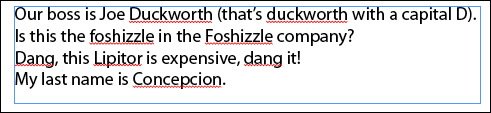
I export the contents of that text frame to a TXT file (File > Export > Format: Text Only), clean up the text file a bit in a text edior (get rid of punctuation, mostly), and then I import the text file into my custom dictionary in InDesign. It’s easy: choose Edit > Spelling > Dictionary, choose the name of the custom dictionary from the Target menu at the top of the dialog box, click the Import button, and select the text file I just cleaned up. Here are the results:
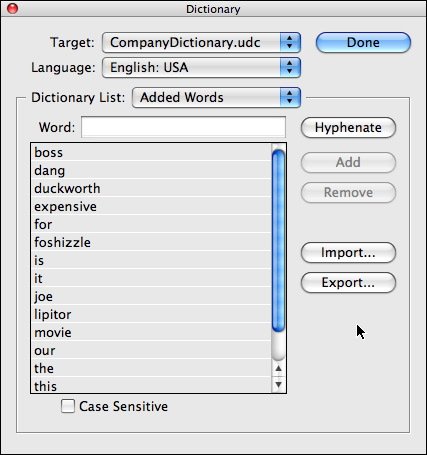
Notice that the Case Sensitive is “off” (the checkbox is empty) at the bottom of the dialog box, which is the default setting. It would do no good to turn it on now, because all the words have been converted to lowercase during the import (since I didn’t turn on the checkbox first)! That’s a feature-not-a-bug.
Anyway, let’s see what our text frame looks like now:
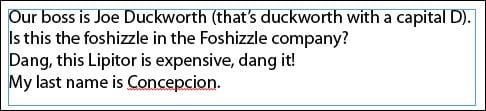
Apparently, every word is spelled correctly (except for Concepcion, which I removed from the text file as a control) because InDesign is ignoring the case. If it’s listed in the dictionary, and spelling in the layout matches, then it’s correct.
What my client wanted was for InDesign to flag the lowercase “foshizzle” and “duckworth” (no, not those actual words, silly!) during a spellcheck because they should always be capitalized in their publications.
Easy enough to fix in InDesign, especially since I still had the text file around and it contained the proper capitalization. (It’s possible to fix these manually, one by one, but I’m lazy.)
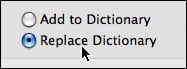
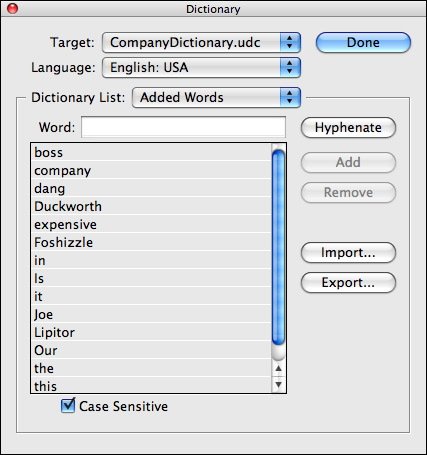
I opened the Dictionary dialog box again (Edit > Spelling > Dictionary), chose the custom dictionary in the Target menu at the top, turned on the Case Sensitive checkbox, and clicked Import. When I selected the text file, I made sure to choose Replace Dictionary so I wouldn’t end up with both upper and lowercase versions of the words (which to InDesign means “ignore case for this word”). I wasn’t worried about duplicate words, since InDesign strips those out automatically.
Now my custom dictionary looked like this:
In order to see the effects in my document – which while I was getting a cup of coffee, had sucked in the previous set of custom dictionary words into its internal document dictionary – I had to copy/paste the text frame to a new file. The new document had no memory of the old, case insensitive dictionary, just the current one.
Here’s the spellcheck markup InDesign then applied:
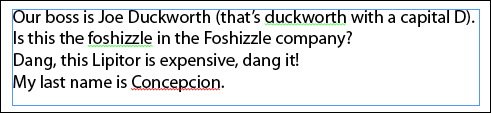
Concepcion is still misspelled, since I never added it to the dictionary. But if you look closely (I’m making the screen shot larger here), you can see a green squiggle under the lowercase “duckworth” and “foshizzle” indicating a capitalization error. If I right-click on these, InDesign suggests the capital version of it as a correction.Woo-hoo!
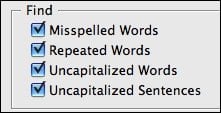
One last thing … if this isn’t working for you, be sure that you haven’t turned off “Find Uncapitalized Words” in your spelling preferences.
 |
Okay, well, in view of the lack of response to this article, I guess I am the only one obsessed with the spell checking function and how the dictionaries work in InDesign. Could that possibly be true???
It’s lonely here. Lonely and cold.
Hey, I found it pretty noteworthy. But as all forums go, it’s only when people have problems or more questions that they jump right to the forum. Nice work! :-)
Thank you Chuck. I am pathetically grateful. I’m petting the smiley face at the end of your message and saying, “My precious, my precious ..”
You were sweet to reply. ;-) I am of course just kidding. Okay half-kidding.
Ah, that’s nuthin’. I wrote a post last summer that’s STILL waiting for a comment. I call it The Lonely One.
I liked this post too. We need a little doodad that adds a button at the end of each post, so people can just click to give a quick thumbs up or something, when they don’t have the time or desire to write a full comment. A Foshizzle button, perhaps. Or if we could get fancy, a slider with FTW on one end and WTF on the other. Yes, a FTW-WTF slider. Very palindromic.
Nice one, Mike.
Ever noticed how, after Monday and Tuesday, even the CALENDAR says WTF? . . .
Excellent tip! Thanks.
Very helpful information, thanks! I’ll be using that! :-)
Excuse Anne Marie if I am reading it one day late!
Thanks for the detailed explanation, not a lot of people take advantage of building dictionaries and adding words to them and thus have to spend a lot of manual proof-reading.
Rest assured many of us will invariably come often here to read your articles and tips of the week eek eek eek.
Okay okay I am now completely mollified. It’s no longer lonely and cold, actually it’s getting a little crowded in here.
Mike where is that post? I’ll post a comment-of-mercy. ;-)
The Lonely One is here: https://creativepro.com/type-off-a-path.php
But you don’t need to leave a pity comment. I kinda think of it as in “mint” condition. A real collector’s item ;)
Your hint saved my morning… Thank you!
Sabine from germany
You’re welcome! Glad it helped.
This was really helpful, even months later.
Any information about the “removed” and “ignored” words tabs, and why they don’t allow adding words to a custom dictionary?
Thanks.
Jen,
The “Removed” words tab can import/export word lists. The idea here is that you add a word which the dictionary thinks is correct, but you want to have flagged as misspelled. (This works when using the Check Spelling dialog, but not via Dynamic Spelling it seems). You can find this in the “exceptions.txt” file for your dictionary language.
The “Ignored” words can’t be imported/exported. In fact the Ignored words only survive for the duration of your InDesign session.
Best regards,
Heath Horton
Mindsteam Software
LOVE THIS!
I was an at-home proofreader and just started a job in the corporate world as the in-house proofreader for a company that produces all collateral for five of the Vegas casinos.
It is inconceivable how they have ever gotten this far using the InDesign to Word workflow process.
InCopy ALL THE WAY!
Thanks, keep them coming!
What??? InCopy in Vegas??? That’s SO excellent!!!
I hope you’re coming to my InDesignSecrets Live seminar in Vegas in a couple weeks (Nov 2, 2011), I’d love to meet you! … https://ids-lv.eventbrite.com/
Very useful information. I finally see how you can turn off spell check for Uncapitalized Words and Sentences! And it was so obvious, don’t know why I didn’t see it myself. Thanks!
Hey,
I have a problem, im typing a document in indesign and the dynamic spelling doesn’t work. I set the dictionary language in Dutch aswell as the language in the characters tab. When I check spelling manually the dictionary works, but that takes way to long. what do i do to make dynamic spelling work?
Hi – 10 years of using InDesign and finally got tired of hitting “ignore” for all-caps and camel case. It never occurred to me that this could be changed, so thanks for the info! Always good tips to be found at InDesign Secrets, always learning.