


Clear Text Overrides from Word Files


WBB wrote:
This is an age-old problem for me… How do I get my Word styles to import nicely into InDesign without having to do all that manual formatting in InDesign to take out the stuff Word left behind? I create a style in InDesign, apply styles in Word, using the same exact name as I do in InDesign, then import the text into InDesign. But the imported text is not how it should look! It still has some Word formatting!
You may not realize it, but you almost certainly have some sort of local styling on top of your paragraph styles. Place your text cursor in some text and look in the Paragraph Styles palette; a plus sign next to the style name indicates local formatting (style “overrides”). Even better, if you hover the cursor over a style with a plus sign, it will show you what the local formatting is in a tool tip window.
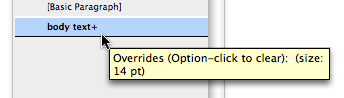
As the tool tip points out, you can Option/Alt-click on the style name to clear the local formatting from this paragraph. But that’s not the whole story. If you want to clear both local formatting and any character style applied to the text, Shift-Option-click/Shift-Alt-click.
But the problem with both of these is that you have to place your cursor in a paragraph first, or select that one paragraph, or select more than one contiguous paragraph to clear and apply the style to all those paragraphs. So InDesign offers a better solution: The Clear Overrides button.
Let’s say someone changed the text for an entire story (headings, body text, and so on) by selecting all and changing the font size. That all shows up as local formatting, but it would be tedious to remove with the Option/Alt-click trick. Instead, select all (Command/Ctrl-A) and click the Clear Overrides button (or choose Clear Overrides from the Paragraph Style palette flyout menu).
Or, you can Command/Ctrl-click on the button to clear only character formatting overrides; or Command-Shift-click/Ctrl-Shift-click to clear only paragraph formatting overrides. (Personally, I never use these variations, but I suppose it’s nice to know they’re available.)
 |
Does anyone use QXport? https://www.thepowerxchange.com/ms_word_addins_1377_prd1.html
It is a MS Word addin that can create Xpress tags or InDesign tagged text file. I used to use it in the days of Quark 4 & 5, but haven’t used it with InDy.
Same here: I used it for QX a lot, but I haven’t used it for ID. I really liked it back in QX days. It might be very helpful. Let us know if you try it!
Not sure if this is the same thing but came accross this script that clears all formats while placing copied txt.
it is called PasteUnformatted.js if you would like it email me at [email protected]
I found that to clear both local formatting and any character style applied to the text I had to use shift-option-click not Command-option_click like it states above?
A typo or me doing something different?
Sorry, Tom! You’re right, it was a typo. I’ve fixed it above.
Since you asked (in the non-transcribed chat at the beginning of this segment), the paragraph symbol is called “alinea” from the Latin, meaning “of the line”. (Useless bit of information courtesy of Wikipedia)
I’m having a similar problem (I think) in that I’m importing a Word document and I’d like to preserve the italics and bold from that original document. However I want to apply my own paragraph style. I find that sometimes just applying the style works and all the itals and bold stay. However, frequently I need to option + click to get the style to apply properly and then the individual formatting (bold and ital) are obliterated.
Is there any way to apply the style and keep the old formatting? Styles were not applied in Word.
One of the best solutions, Steve, is simply to search for all Italic text and apply an Italic character style to it (you have to define this character style first, of course). Then when you Option/Alt-click, all the formatting is wiped out except the character styled italics.
We’ve had ongoing issues with character formatting. Does anyone know how to get rid of the floppy disk icons in the Paragraph Styles palette? I used to know how to do it in Pagemaker. I think this is keeping a link to the Word styles and is causing problems.
We’ve been having issues with Paragraph styles not always working and can’t seem to find a solution for this. Sometimes it just won’t read the text and other times it puts the wrong point size on the text, sometimes in the middle of a paragraph for just a few words. This is making the editors (and us) crazy. Any help is welcome.
Karen, the floppy disk icon doesn’t mean it’s linked to the Word file. It just means that the style came in from the Word document (rather than being defined in the ID document first). It’s harmless, but just edit the style in ID and the disk icon goes away.
As for para styles sometimes not working… the best solutions are listed above!
OK, I was tearing my hair out with the same issue. But I think there is an easier way. When I was in the Word import options dialog box, I noticed that the “Preserve Local Overrides” radial button was still checked, even though it was grayed out because I had “Preserve Styles and Formatting” checked. What I did was check “Remove Styles and Formatting” so thatI could uncheck “Preserve Local Overrides”, then I rechecked “Preserve Styles and Formatting” and proceeded with my customized style import. For some reason this fixed my problem and the word styles were properly swapped out with my InDesign Styles.
Minh, that’s interesting. The Preserve Local Overrides checkbox shouldn’t matter one way or another when Preserve Styles and Formatting is turned on (because it’s grayed out). I don’t see any difference when I have it on or off. In particular, that doesn’t seem to have any effect on the + symbol overrides for me.
I do an annual project, 100+ page booklet, that is edited by several people in Word before being placed in ID. I have found that the easiest/best way of doing this is to:
1. Make CERTAIN my style names are IDENTICAL between ID and Word.
2. Make CERTAIN my styles in Word are applied impeccably.
3. Use character styles for bold, italic, etc–NEVER local formatting. (This preserves the formatting when you then use Clear Overrides after placing in ID.)
4. Place text from Word to ID; don’t paste.
This year, I placed 110+ pages of text, including a number of tables, in only a couple of hours. It required only minimal clean up; yeah!
I have been instructed to strip Word text by resaving it as plain text before placing or pasting it in InDesign to ensure that there won’t be any production glitches. Is this really necessary anymore with CS4? I haven’t encountered issues when I select the text in Word and then paste in InD. In fact I save time in formatting if I past over already formatted InD text. The pasted text automatically becomes the style that it is past in place of.
Canl any one help to clear overides in style sheet???
If you have to force clear the overrides then hold down CTRL (CMD) ALT SHIFT when clicking the style.
You should try using the Paragraph Override button at the bottom of the Paragraph Style Panel first.
And check that there are no character styles applied or Nested Styles. You can find nested styles in the paragraph style settings, under Drop Caps and Nested Styles.
I am having problems when a paragraph style is based on another paragraph style (this is how the templates often arrive from the designer). If I try change the font on my paragraph style and break the connection between the two styles, the the font will not change, and there is no option available to clear overrides. I’m using CS3. Help!
Is there a way to put this Word Formatting Clearing in a Paragraph style? Or do you have to press ctl/alt when placing text?
Moving from PM 6.5 to InDesignCS4. My challlenge:
1. To place tagged RTF’s to link with the predefined Styles, like:
1 Fra Højme Endestation . . .
6 | Scandic Hotel . . . . . . . . .
The nearest I get in ID is: “ID Tagged Text”, but still we would have to do changes in the exportfilter regarding encoding and tags. Anayone know a PlugIn that does the import task like PM 6.5?
2. PM also had the update-function when one of the linked documents is altered, then it keeps track and askes if you want to update. Is this possible in ID – or should we rewrite to XMP?
Sorry, the tags in my last Comment dissapared!
Moving from PM 6.5 to InDesignCS4. My challlenge:
1. To place tagged RTF’s to link with the predefined Styles, like:
(PCR_V7_8_S)
(PCR_V7_8_G)1 Fra Højme Endestation . . .
(PCR_V7_8_G)6 | Scandic Hotel . . . . . . . . .
The nearest I get in ID is: “ID Tagged Text”, but still we would have to do changes in the exportfilter regarding encoding and tags. Anayone know a PlugIn that does the import task like PM 6.5?
2. PM also had the update-function when one of the linked documents is altered, then it keeps track and askes if you want to update. Is this possible in ID – or should we rewrite to XMP?
@Rolf: I believe you can get some of that functionality with Formatting Tools from https://in-tools.com
Yes, InDesign can link to rtf files. It’s in the Preferences dialog box.
When I try using the place feature in CS5 and have the styles named identically, it’s only the style size and colour that change, keeping the font used in Word rather than changing it for the one defined in the InDesign style. I have to select the text frame and click on the Clear Overrides button to get everything the way it should be.
Surely there’s a fault somewhere?
@Iestyn: This has been a problem for many years. You are not alone. But what you are describing indicates that there is local formatting in the Word document. To fix it you need to either do what you are doing in ID, or go back to Word and clean up the document (make sure all the text is styled exactly the way the style defines it). You can also use the Remove Local Overrides feature in http://www.blatnertools.com to clean it up in InDesign.
Despite using all the excellent tips above to clean up Word manuscript, I have been having another issue where after I get all of the character style overrides cleared up, I then remove all of the remaining overrides only to have a random character tag apply itself to the majority of my text! Am I missing something simple, or are others encountering this anomaly as well? It makes it pretty impossible to keep the correctly applied character tags and remove the unwanted one.
Hi all,
I am having problems when a paragraph style is based on another paragraph style (one or more clear Text override and make style created). If I try change the font on my paragraph style and break the connection between the two styles, the the font will not change, and there is no option available to clear overrides. I?m using CS3.
Please help frnds.
@Mark: That is very weird!
@Kumar: You might want to ask these questions in the forums instead of in a blog post comment, which not as many people see.
My guess is that you have a character style applied to the text on top of the paragraph style.
what if I have a book with 400 pages, and has all the footnotes been overrides, how to make it all at ones?
thank you
You’re not alone. I’ve got a book template that must have quirk. Even a purely text document placed from TextEdit can come in with (in my case) a Hyperlink character format applied. It drives me batty.
This has happened to me before, and it’s almost always because I have had a character style applied to text, then deleted all the text, leaving what looks like an empty paragraph waiting to have text imported. When I import text, it gets the character style that is lying in wait invisibly at the beginning of the paragraph. The quick trick to test this is to type a few characters at the beginning of the problem paragraph. If you see it does have a character style applied, select, and apply Character Style > None. THEN delete the line. The problem shouldn’t occur when you import text the next time.
Nancy, you can then go further to eliminate applied styles before they begin:
1) Redefine your basic text frame object-style to begin with the most frequent desired paragraph style, or create a new obj-style for your frames. Set your master frames to this style as well.
2) With nothing selected, set your Paragraph, Character, Object, Table, and Cell styles to the defaults that you would like to use by default. When my team was learning indy, we frequently inadvertantly had set the defaults to obscure paragraph and character styles, and it took some time to realize why strangeness was occuring throughout documents.
On book projects (50-90 chapters, multiple revisions) I reset these before returning chapters to compositors — they don’t seem to notice the oddities, and I don’t have to clean up so frequently after them.
Many thanks for the tip. I’m dealing with a 400+ page scientific book imported from Word documents and most paragraphs, even though styled for ID, retain elements of their formatting. Changing each paragraph by hand would take hours.
There’s a terrible Catch-22 here. I have to retain that local formatting on import to keep the italicized words and superscripted endnote numbers of the original. Re-entering those would be a huge pain.
The trick is to import that Word document with the local formatting retained, then use search and replace to change that local formatting to an ID character style. For instance, search for a Font Style-Basic Character format of Italic, then replace it with an Italic character style.
Then when you select the entire document and run Clear Overrides as described above, it will strip out that now-pesky Word formatting but leave the ID character styles untouched.
Also, before you do any global change like this, save a copy of your document just in case that change goes awry. It’s also a good idea to test any change on a small block of text, say a few representative paragraphs, before doing it on everything.
I’ve started working on that science book and have another suggestion. When you S&R for character formatting to change to styles, you might want to take the time to make each replace manually. Doing that, I’ve discovered a lot of stray formatting, typically bold or italic formatting of a single letter or space character. I suspect the writer accidentally hit a short-cut key and inserted formatting without knowing. Doing a blanket conversion would have converted that misplaced formatting to a misplaced style that would be hard to spot, particularly buried in hundreds of endnotes.
Yet another suggestion. Before you get rid of anything in the original, ask yourself if it has value. For this book, as I imported each chapter, I rather ruthlessly culled out all double-spaces. Only about half-way through did I realize I’d made a mistake.
Almost all those double spaces were after the number in the endnote text entry. Since the Word original didn’t have a period after those numbers and I want one, being able to search and manually replace double spaces with a period-space would have saved me a lot of time. Alas, half the book doesn’t have that crib.
Keep in mind that, as pesky as it may be, sometimes that text and formatting from the Word original may contain information that you can use to save time. Don’t trash it without asking, “Should I use this for some purpose before deleting it?”
This reminds me of when I worked in a hospital caring for kids with leukemia. They’re so medically fragile, before you do anything you need to ask yourself, “Am I doing this right?” Formatting books isn’t nearly as critical, but taking care and thinking before acting will still save a lot of time.
–Michael W. Perry, author of My Nights with Leukemia
Hi. None of these advices has worked for me. I received a Word file heavily formatted as if it were a printed book: the page orientation and size, footnotes numbers as superscript text but no actual footnotes, section names in table style, parts of the text in two columns for no discernible reason, empty tables between paragraphs. A total nightmare. The font used was Calibri. When I placed the Word or copied and pasted into my InDesign file (because I tried both), and ply my Paragraph Style the font changed to two different fonts and different sizes, apparently haphazardly, none of which the one from the style. No Clear Overrides button or combination of keys worked. I couldn’t use that file, so I saved it as plain text and asked the editor to put back all the italics and bold to the text. I have similar problems with other file, I had to apply the font and size to almost the 200 footnotes of that book. When I made the PDF file for printing, some paragraphs, lines, footnotes, and captions were in 4 colours even though the rest of the text was black as the style set. It’s very difficult to work like that because I get the commission after the authors finished writing and the editors don’t want to ask them not to apply any style but italics and bold or change it. And sometimes that doesn’t guarantee that it won’t cause problems either. There shouldn’t be these compatibility problems at this point.
If the “clear overrides” button is gray, but there is obvious overrides, then there is usually a character style applied to the text. (See the Character Styles panel, and try clicking None)