


Convert Multicolumn Text Frames to Individual Frames Script


Yes, that’s right, it’s time for another episode of your favorite show: You Need a Script! Today’s contestant is Paul, who wrote:
I am currently training in a newspaper workflow where they generally design in single text frames divided into columns. They are looking for a script that will break these columns into linked frames with the copy running through them as before. They sometimes need to do this so as to make one column wider than the others.
Paul, what can I say? (Everyone join in) You Need a Script!
Unfortunately, when you wrote to us, such a script didn’t seem to exist. So we turned the thumbscrews on our friend Steve Wareham, who wrote one up in a jiffy. Once you install the script (just put it inside the Scripts Panel folder on your hard drive) you can select any multi-column text frame, then double-click on the script to convert the columns to individual frames. It’s awesome!
Before:
After: 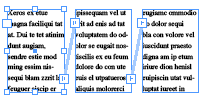
You can find the Columns2Frames.jsx script by clicking here. (It’s a zipped file for easy downloading; don’t forget to unzip it!)
[Here is a CS5 version of the script in zip format.]
(Folks, if you find yourself in need of a feature that InDesign doesn’t have, you might want to contact Steve or another scripter to help you achieve your goals. Then, if you think others might benefit from it, let us know and we’d gladly post it and give you credit for it. We’re working on compiling an index of scripters)
By the way, Paul followed up with us, noting, “The script does exactly what is needed. Brilliant job. Although many people will wonder why this script is needed, the fact is that newspapers often need — at very short notice — to extend one column longer than other or extend one column wider or narrower around an ad.” Excellent point! Another option, for those who haven’t seen it, is the SmartLayout plug-in from Woodwing. It’s pretty amazing, but also more expensive, of course.
 |
Wow, that’s a handy script also for us non-newspaper folks, so many thanks from Norway to Steve Wareham!
Cool script. I don’t use columns in frames very often, but in an upcoming project I will need to, so it may just come in handy.
Question time: is there a way to link an Excel sheet to a table and have the table be broken into separate tables where blank rows are in the Excel sheet? Or perhaps some other, faster way to get hundreds of tables out of one Excel sheet without copying and pasting every table’s contents separately?
@Sandee: You are absolutely right! However, in some cases, scripters write these things in order to show their skills and drum up new business.
Is there a way to do this in the CC versions of inDesign?
@Kyle: CC does not have this feature built-in. I believe the script still works…?
Well, I worked on a similar script that does pretty much the same thing based on some initial code by loic_aigon some time earlier this year, you should be able to find it in the InDesign scripting forums on adobe.com if you search for “break columns”. It has complete integration into InDesign CS3’s menu system (several languages are supported), doesn’t mess up links to InCopy stories etc., so it might be of interest as an alternative for some people. There are still a few bugs, though, (I have had some strage errors when loading it as a startup script using the session scripting engine for example), but I haven’t found time to address that yet.
I haven’t had a chance to try Steve’s script either (I’m really, really busy right now, sorry) even though it looks awesome, but in case he is planning any further updates or enhancements, it might make sense to merge the two code bases to avoid any further duplication of efforts.
For those doubting the usefulness of such a feature: I found myself using our script a lot more than I had anticipated originally. I had never realized how often I had to split multi-column frames manually. I also like to do quick mock-ups and then decide that I want to size columns differently. So I definitely recommend that everybody download Steve’s or our script. I hope that Adobe will provide such a feature as a built-in command in the future, but for the time being, I’m very happy that InDesign is so extensible via scripting.
Peter
What a great script?we do brochures and catalogs and have always had to do the guerilla layout of creating a multi-column and then taking the measurements and going back and creating the individual columns manually. This is really a god-send.
The only problem we had was with trying to use the script in existing documents with a lot of styles. We got javascript error messages in one file and InDesign wouldn’t recognize a selected text block in another. Is there any workaround or sugesstion on how to get around that? We even tried dropping in a fresh text document and it didn’t work.
Great script indeed. I?m often doing a newsletter that start with 3 columns text frame that I need to split for design reasons. That would save a lot of time.
Peter, I wasn’t planning on any future updates, but after reading Paula’s comment, maybe one is necessary. Paula, send me the error message you get on email and I’ll take a look at it.
Also, Peter, you probably discovered this as well, while testing David found what might have been a bug where the value of the column width of a text frame wasn’t always being updated when values were entered manually. So I had to calculate the value of the column width instead of using the ‘textFrameProperties’ property.
Ok, I re-posted our script, the URL is https://www.speedshare.org/download.php?id=1619BF2813 . You can find the corresponding discussion on the Adobe forums at https://www.adobeforums.com/webx/.59b55423/1.
@Steve: I’m not sure about the bug you mention, the calculation part is pretty much a copy of Loic’s original code, but I think we used textFramePreferences for most of the attribtes, but I’d have to check on that (sorry, my experience with ID’s object model and JavaScript in general is pretty limited). As I said, I don’t have much time at the moment, but I’ll definitely try to re-test our script for that problem as soon as possible. One of the major issues I ran into with our script is that it does not work correctly on text frames that have been transformed, so I’ll probably have to copy the linear part of the transformation matrix to the new frames and also transform their position offsets, but I’ll have to look into that in less stressful days.
kewl…
Nice scripts (both of them).
Steve, I believe there’s a critical bug in your script which will send the script into an endless loop if the text frame is off the page. Your findPage function assumes the text frame is not on the pasteboard…
Thanks Harbs. I’ve sent David an updated script.
Okie dokie! The script link in the post now points to the new script (same name).
Does this script work only with CS3? Or also CS4?
Check out the free movie at Lynda.com showing how this script works!
One problem I found with this script is that it creates the same amount of seperate blank text frames as you made columns and puts them in place if you undo (Ctrl+z) it.
E.g. If you choose to split a text frame into three columns run the script then undo this you get 3 blank text frames, the same width as a column, on top of the original frame.
@Andy: True, but that’s only if you Undo once. The script has actually stepped through many actions in the blink of an eye. If you want to go back to where it was, you could use a tool like History to jump back more than one step at a time, or you could save the document before running the script, then revert it if you don’t like the effect. That’s true with all scripts.
The script works like a wonder in CS3 & CS4. But in CS5 it won’t. How should it be fixed?
It always gives an alert: The frame needs to be on page for this script to run”, where ever the frame is.
@Kai: With some help we’ve updated the script to work in CS5. See the link in the body of the blog post above.
Awesome. This will come really handy! Thanks.
Love this script! Thank you!!
Awesome… just what I needed.
What does “The textframe needs to be on a page for this script to run.”?
The textframe I selected is on a page.
Never mind – the CS5 version worked just fine. My bad…
Great script! We use it all the time
When I try to use it always tell me the error “Text frame have to be on a page for this script to run”. Text frame is on the page, i tried with different ones but it didn’t work.
Do you have idea how to fix this?
I have the same problem as Nikola. I’m using version CS6. It says: “The texframe [sic] nees [sic] to be on a page for this script to run.”
Found this one, works in CC for me: https://kasyan.ho.com.ua/break_columns.html
Thanks Patric! I will try that one in my next job.
Any chance this script can be updated for ID CC 2018?
This script doesn’t work for me. I have InDesign cc and keep getting an error message stating that the “textframe nees to be on a page for this script to run.” Exact words.
Hi guys, when running this script I get the error
The text frame needs to be on a page for this script to run. Any idea what the problem might be?
Never mind, sorry, folks use the CS5 version
Doesn’t work
“The textframe nees be on a page for this script to run.”
error message is spelt wrong and doesnt make add up as my text frame is on page
That’s weird, as the “CS5” version linked above does work for me (using the newest version of InDesign CC).
This is a script I didn’t know I needed! Thank you, the CS5 version works great on InDesign 2024.