


Convert Numbering to Text in InDesign


Daniel wrote:
Recently I had to export a document with lists (numbered questions with a, b, c… answers) to RTF, so it could be printed in Braile, but InDesign striped the numbers from the lists when I exported it (no numbers on the questions, no letters on the answers). Do you know any workaround to this strange behavior?
I’m going to have to agree with you that this does seem like strange behavior; after all, numbering or bullets are just paragraph formatting, such as indents and so on, and that should export in RTF just fine. However, you’re right that bullets and numbers get stripped away upon export. The good news is that you can convert those lists to real characters.
Here’s a list, with all the text selected (with Command/Ctrl-A):

Notice how the numbers aren’t highlighted — as though they aren’t even there. Now, let’s choose Convert Numbering to Text from the Type menu (or the Context menu):

This changes all the auto-numbers to real characters that can be selected:
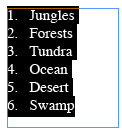
Note that you can also choose Convert Numbering to Text if you have one or more non-threaded frames selected with the Type tool (that’s often faster than selecting all the text).
Now, if we export this story, you’ll get real characters in the RTF. Of course, you should only convert the numbers or bullets after you’re finished editing the document and you’re sure you won’t need to use the auto-numbering feature anymore.
 |
David, thanks for the quick response. Had to slap myself, while reading, as i realized that i had seen the convert numbering to text in the past, and wondered why would anyone need such option. Just forgot about it when I most needed it. Will save me a lot of work in the future. Thanks again.
Funny thing is that it works the other way around.
If you have an RTF file with a number list, it’s honored in ID and even comes in as a number list.
Aren’t numbered lists in RTF limited to what Word can support? Don’t ID’s lists provide more options which therefore can’t be represented in RTF?
I guess that’s just an assumption on my part.
Dave
I recently did a book that had numbered paragraphs, the running heads changed on each page using variables and had to contain the numbered paragraph. But alas, InDesign won’t “see” the numbered paragraph for the variable, so at the end of the book I had to convert all the numbers to text so that they would show in the Running Heads.
You can use start new section for running heads and have a separate style. You can do this in InDesign!
The non-threaded text is all converted to text with just a blinking text icon (as if it is threaded) so that you don’t have to find and choose each unthreaded box? I am confused about that statement, I will have to experiment.
If you are using Paragraph Styles with bulleted/numbered lists there’s another way to do this. In the Paragraph Styles Panel, select the style. Then from the Paragraph Styles Panel Menu choose “Convert XXXX Style’s Numbering to Text.” This will convert the numbers to text for all the text with that style applied. This works throughout the document, regardless of the selection.
Thank you Daniel, that worked better for me. If someone is looking to implement Daniel’s way, I just wanted to specify that in the paragraph styles panel you need to right click on the style to be able to see the option “convert (style name) style’s numbering to list”. I searched quite a while in the paragraph style options before I found that out.
Screenshots here: https://forums.adobe.com/thread/1877016
I have also experienced this when converting to RTF. But another thing about numbered or bulleted lists is that they are unaffected by a text wrap. The solution again is to convert to text.
Is this limited to CS3 only?? or am I missing something in my menu. I’m on CS2 btw.
Jimmy, in CS2 you don’t have the Type > Bullets & Numbering menu item, you’re right. But the command to convert numbers (or bullets) to text is available in CS2 — select the autonumbered paragraph(s) and then right-click. You’ll find the command in the contextual menu.
Thanks for the information.
Hi All,
Does anyone have any thoughts on how to handle this situation?
I have a numbered list, and I’ve added “Chapter: ” in the paragraph style before the auto number so that it reads:
Chapter 1: Introduction
Chapter 2: Let’s Begin
Looks great, but when creating hyperlinks for them, I can only select the name of the chapter, since it is still text.
Doesn’t seem to be a way to make the whole thing show up in the hyperlink without converting to text. Otherwise, it’s to Acrobat to adjust the hot spots manually…
Is there a better way?
Thanks,
Barry
Hello to all from here. I would have a question regarding the footnotes in Indesign. Why these footnotes cannot be selected with a Ctrl+a? Why can I select just one? Is there a method to pus upperscript the number of the footnote?
Thanks, Liviu
To answer the final question. You can by using the character style pallet or by creating a Paragraph style which has includes a nested character style where the first character is superscript. The answer to the Ctrl+A question is they are in separate containers. I’m not sure of a way to join them, I’ll leave that to smarter minds than mine.
You can also get this info in Real World InDesign by David Blatner & Sandee Cohen or InDesign Killer Tips by David Blatner & Ann-Marie Concepcion. (No I’m not their rep)
For Mr. Jimmy Alexander,
Can you write some steps in doing this “nest”? I have tried with caracter style but no result.
Many thanks.
I should have said nested Paragraph Style.
This is crucial if you need to outline text with bullits.
Collecting footnotes
It’s not possible to reformat a footnoted InDesign document to have endnotes instead. Nor can you select more than one footnote a time. But it is easy to grab all the footnotes in an InDesign document – even all footnotes throughout a book – and put them into one story, much like a collection of endnotes.
1: Choose Layout > Table of Contents.
2: Add the paragraph style that you’ve applied to footnotes in your document into the Include Paragraph Styles list. (Do this by double-clicking its name in the Other Styles list.
3: Choose the No Page Number option from the Page Number pop-up menu. If drawing from the whole book, check Include Book Number.
4: Click OK, and flow the TOC story that InDesign generates. Now you have copies of your footnotes all in one place. Your original footnotes are undisturbed.
From the support staff at Adobe
Hints:
If you are using DTPTools’ Cross-References plug-in, you will also want to convert any cross-references that you have to text (“Convert all cross-references to text” on the plug-in’s panel menu). Do this first before converting your bullets and numbers.
If you have table(s) containing bullets and/or numbering, you will want to select the individual table’s contents, and do Type > Bulleted & Numbered Lists > Convert Bullets and Numbering to Text. After you have converted your tables, then convert the balance of your document (otherwise, the conversion may not fully and completely “reach inside” the table).
Now, is there any way to preserve auto-numbering capabilities in the generated .rtf file?
How to convert all numbered list to text using That java script.?
This one liner JavaScript will do the job:
app.activeDocument.stories.everyItem().convertBulletsAndNumberingToText();
app.activeDocument.stories.everyItem().convertBulletsAndNumberingToText();
Masood, is there a way to apply this script to all opened documents not just the active one? Thanks
thanks so much
Can we reverse the text to the numbered list?