


Custom Page Sizes in the New Document dialog box


I can’t believe I never knew this, but on my recent trip to Australia, former-Adobe employee, and wonderful InDesign beta-coordinator Elliot Harper told me of a feature that he created for InDesign back around version 2. (That’s actually version 2, not CS2.)
Now that I’ve got some time in Iceland, after working in Dennmark (I love place dropping all the countries I’ve traveled to this year), I thought I’d write it up for you.
Let’s say you would like to save the page size of a business card. I always thought the only way was to set a custom size and then save that as a preset. But I was wrong.
What you do is open the Presets folder in the InDesign application folder. You’ll find a txt file called New Doc Sizes. Open it in Text Edit (Mac) or Note Pad (Windows).
The document, written by Elliot, explains how to create your own custom sizes in the Page Size menu. Rather than wade through all the text, the bottom line is anything you type without a semi-color (;) in front of it, becomes the information for a new setting in the Page Size menu.
So, for example, you want to have the custom sizes for a business card. You type the words business card (or as I’m in Iceland right now, you type Nafnspjald followed by a space and then the size for the width (85mm) and then the height (55mm).

You can type in any units with spaces or tabs separating the amounts.
Save the document. You don’t even have to quit and restart InDesign.
Automatically, the next time you choose File > New, you will see the setting for the business card (Nafnspjald) in the menu.
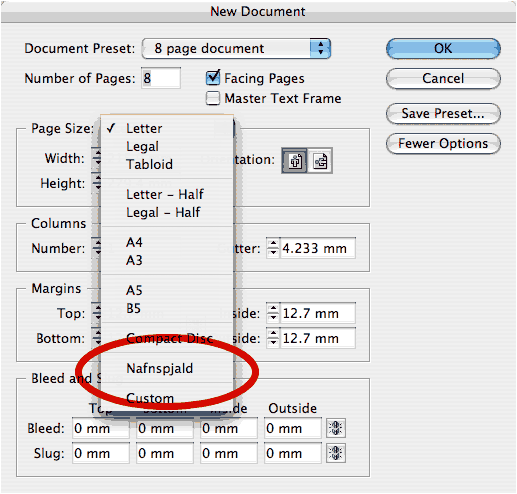
I love this! I would like to see more of these types of text files for supporting InDesign features all over. For instance, I would love to be able to define a whole bunch of style names simply by typing in the names in a text file and then placing them in a folder. The style definitions could come from the default basic style. But having those names automatically appear would be very helpful. Same with Swatches. Custom strokes. And custom sizes for stroke widths.
I’m sure you all have loads of other suggestions. Hey Adobe! Listen up. This is a neat way of working.
 |
To be honest: this is very well known and in our own trainingmaterial even documented with an example by our authors at Opatel Graphic center for the last few years…
…and also doumented in my own book about CS3 (only available in Dutch)…
Agree with Veghel..
It is well khown, and it also in Photoshp…
OK, so it’s not exactly a “secret.” In fact, I see now that it’s in the Help file.
But then how do you explain that in the past three weeks, I have shown that tip to 30+ people in Dennmark and Iceland, and no one knew about it?
Come on, folks… This is not a contest to see if we can find “secrets” that no one knows! Sandee just pointed out something that we all know: We can use the program for years and still have something to learn. There is always more to learn, and some beginners know features that advanced users don’t know (and vice versa).
For example, I love showing how people can do math in panels and dialog boxes, and even some people who have being doing DTP for 10 or 15 years are amazed. It’s hard to break it to them that this was a feature of QX in 1990 and has been in ID since version 1. The important thing is not “who knows what first,” but “how can we share great info with each other.”
Thanks, Sandee, for documenting that great tip here! Have a great time in Iceland.
(By the way, I remembered the name of the Icelandic movie I was going to recommend to you: Cold Fever. It’s beautiful.)
Thanks David. Another example of why I remember fondly sitting under your teaching at a conference in Nashville a LONG time ago.
Well said David. I didn’t know about doing this, I don’t usually go near the location of the adobe files except to add in scripts. Wouldn’t it be cool if you could just double click that script, or drag it into the panel (maybe you can do this?) to get it available in InDesign.
But again I didn’t know that you could do this. I wouldn’t be surprised if others new about it and others don’t. It’s not an area that many go into, but certainly the same people in the same circles would go near these types of “hacks”.
I really love coming onto InDesign Secrets everyday and I find it a little sad that people are trying to outdo or give out about something that is totally free. A bit hypocritical in my view. But that’s just me.
Thanks for the tip, I can’t wait to see what comes next… perhaps something to do with variable? I use them a lot but I’m sure there’s something I don’t know about them…
Bravo! I have no problem saying that I’ve been using ID since version 1.0 and had no idea this could be done.
Why would it be useful to have a bunch of blank styles?
Anyway, add this script to your scripts folder:
f = File(“~/stylenames.txt”); f.open();
for( n in (t=f.read().split(/[\r\n]+/)) ) try {
app.activeDocument.paragraphStyles.add({name:t[n]});
} catch( ex ) {}; f.close();
I think the idea, Dirk, was to be able to export styles in a human-readable, editable form, so you set them up in a text editor rather than having to troll through the Paragraph Styles dialog.
Dave
This is a great tip! And no, I didn’t know about it until now. Thanks Sandee!
>We can use the program for years and still have something to learn.
I agree in full. Just read a German magazine yesterday with 30 InDesign tips. And some were new to me. Also I didn’t notice the Remove transparency option in the fly-out menu of the effectspanel, missed that one for some reason. Learning every day. I was only under the impression that the document size was well known, meant nothing by it. Hmm.. for some reason I can not find the right tone in my messages the last few days it seems, sorry all…
Wa, that’s okay. I know what you mean about tone. It’s hard in this kind of forum.
Dirk and Dave, um… I have no idea what that script does. Does it erase my hard drive or something?
David,
Create a text file. Put in it:
Harry
Fred
George
Save it to your root folder (not the desktop; not documents, but the folder that holds those two folders).
Now open a document and run the script — you’ll need to convert the smart quotes in the first line to dumb quotes.
You’ll have three styles added to your document named Harry, Fred and George.
Dave
Now I think about it, the tagged text format comes very close to providing what Sandee asked for. Make a style named George. Type the word George in it. Export the word as tagged text.
Voila! A text file that defines a style. Edit it to your hearts content and then place the file into a document that doesn’t already have a style named George.
Dave
I owuld have to agree with David Blatner – this isn’t a contest to see who has the best secrets. I can’t tell you how many people I have amazed with the “Math” trick – and its well documented. Sometimes we get so deep in our own worlds we think everyone knows everything we do. Not teh case. Keep the tips coming. If it doesn’t help me – it might help someone else, and at the very least it jogs my memorty a bit and sez “hey don’t forget about this…”
Oh, thanks, Dave and Dirk! Interesting. I don’t think I would need this, but it’s an interesting idea.
But it does remind me of one of my long-term wish-list items: Everything in InDesign should be controllable via an xml preferences file. The über-preferences for power users. ;)
For anyone who didn’t already know, like me!, here’s the math trick. All I had to do was type “math” into ID help screen. It says in any text box that accepts numerical values, you can use simple operators to change the value in the box.
You have a square that is 34.67pp wide and you need it 22p wider, just enter “+22” behind the value in the width box.
And I definitely didn’t know about the custom page sizes tip. Thanks for that, Vectorbabe.
And I also didn’t know that Nafnspjald means business card.
And there’s another great tip. :)
I’m thrilled with any of the tips here. I may know them, or I may not. Refreshment and reinforcement always helps! Keep the tips coming everyone?please!!!
I agree, this is a great tip. Even if it is something obvious, not everyone may know it.
Next you may show me a way to create a pdf without distilling;)
Usually the people who think they know everything don’t…
Jessica, here’s a bit more on doing math in InDesign.
Thanks for the tip.
David,
Does CS3 do complex math features (10×3/2)? I know you can do this in Quark but not in CS2. Thanks for the tip Sandee!
I know about the New PDoc Size File for a time now and at work with CS2 this works great but now I’m using CS3 at home with my new MacBookPro and there is no New Doc Size in the Presets Folder. I’ve copied the New Doc Size file into the Presets folder but InDesign does not recognize …
I don’t have the file in my presets folder either…I was going to bringit over from CS2 to CS3 but it sounds like Sacha tried that to now avail…
That is very strange. It is there in my version of CS3. Applications > InDesign > Presets > New Doc Sizes.txt. You can see what it says here.
Thanks David for the file, but my file says exactly the same. I’ve just added alle the DIN-formats to it which I want to show up in InDesign. But ID still ignores it … indeed very strange …
I’m a little late to the discussion, but here are common page sizes here we use here at a small printing company. Just copy and paste away, and if anyone has any additions, post away.
A2 ENV 4.375in 5.75in
A2 Panel Card 5.5in 4.25in
A6 ENV 4.75in 6.5in
A6 Panel Card 6.25in 4.5in
A7 ENV 5.25in 7.25in
A7 Panel Card 7in 5.125in
#6¾ ENV 3.625in 6.5in
#9 ENV 3.875in 8.875in
#10 ENV 4.125in 9.5in
Business Card 3.5in 2in
ok, old thread but maybe still usefull for those new to indesign: see below to cut and paste to the txt.file
Too bad they skipped this in CS5.
ISO A0 841mm 1189mm
ISO A1 594mm 841mm
ISO A2 420mm 594mm
ISO A3 297mm 420mm
ISO A4 210mm 297mm
ISO A5 148mm 210mm
ISO A6 105mm 148mm
ISO A7 74mm 105mm
ISO A8 52mm 74mm
ISO A9 37mm 52mm
ISO A10 26mm 37mm
ISO B0 1000mm 1414mm
ISO B1 707mm 1000mm
ISO B2 500mm 707mm
ISO B3 353mm 500mm
ISO B4 250mm 353mm
ISO B5 176mm 250mm
ISO B6 125mm 176mm
ISO B7 88mm 125mm
ISO B8 62mm 88mm
ISO B9 44mm 62mm
ISO B10 31mm 44mm
ISO C0 917mm 1297mm
ISO C1 648mm 917mm
ISO C2 458mm 648mm
ISO C3 324mm 458mm
ISO C4 229mm 324mm
ISO C5 162mm 229mm
ISO C6 114mm 162mm
ISO C7 81mm 115mm
ISO C8 57mm 81mm
ISO C9 40mm 57mm
ISO C10 28mm 40mm
JIS B0 1030mm 1456mm
JIS B1 728mm 1030mm
JIS B2 515mm 728mm
JIS B3 364mm 515mm
JIS B4 257mm 364mm
JIS B5 182mm 257mm
JIS B6 128mm 182mm
JIS B7 91mm 128mm
JIS B8 64mm 91mm
JIS B9 45mm 64mm
JIS B10 32mm 45mm
JIS B11 22mm 32mm
JIS B12 16mm 22mm
Shiroku ban 4 264mm 379mm
Shiroku ban 5 189mm 262mm
Shiroku ban 6 127mm 188mm
Kiku 4 227mm 306mm
Kiku 5 151mm 227mm
Arch A (4:3) 229mm 305mm
Arch B (3:2) 305mm 457mm
Arch C (4:3) 457mm 610mm
Arch D (3:2) 610mm 914mm
Arch E (4:3) 914mm 1219mm
Arch E1 (7:5) 762mm 1067mm
Might be too late for this, but interested if someone can help me:
I’m running InDesign CS6. Nowhere can I find a txt file titled “New Doc Sizes.” I know how to load preset page sizes within the new doc dialog as well as the custom pages feature. However, they are not in any order when I use them in the drop down menu. I’d like to be able to organize them by size or product. Can anyone point me to where I’d be able to do this?
I think the “New Doc Sizes” are not available in CC anymore, but is there another way to change the preferences?
Less friendly in InDesign CC, it’s now become an XML file lurking in the bowels of your Library.
~/Library/Preferences/Adobe InDesign/Version 9.0/en_GB/Page Sizes/New Page Sizes.xml
The directory “en_GB” will likely vary depending on your country localisation.
Also: units of measure appear to be Points with an accuracy of 13 decimal places! (The XML defines the PPI of the document.) So it’s much less straightforward than before when you could simply paste in a list of page sizes in your preferred units.
Thank you.
Organizing Custom Page Sizes in the New Document dialog box
Has anyone come up with a current solution to this issue in InDesign CC (2015)?
Editing the XML file is not as easy as it was before, when editing the Text file.
Here’s an example of a post card preset that I wrote:
Post Card
432
288
72
<kAll
Notice that even though the 4×6 Post Card is set in inches, it is showing here in pixels. And no easy copy and paste from the handy lists that folks have added here. You now have to parse these out into Name, Width (in pixels), Height (in pixels), and Ppi (pixels per inch).
However, there is an easy way, built right into the program, albeit time consuming, as you can only add one preset at a time.
Go to File > New Document …
From the Page Size dropdown, select Custom
A dialog box pops up, which allows you to enter all this information, in your preferred measurement size
(yes, you can type “in” or “mm” or whatever measure you prefer into the fields)
Once you save it, InDesign writes all this info into the XML file, in the format it prefers to have it in, and it is then available to you anytime you start a new document.
Hope this helps. It took me awhile to remember how I did this, so I might have to refer back to this post myself ;-)
Pro Tip: You can enter all your measurements in the New Document dialog, and THEN select Custom from the dropdown and it will fill in everything for you, except for what name you want to call it.
Good afternoon!
We maintain a very lengthy default size list, and I have to update the size XML every time something changes. What I find is that XML is quirky in feeding the names into the size list.
For example, if I update an item near the end of our list, then replace the New Page Sizes XML, then review the sizes in Indesign, it will remove characters from the name of a size randomly in the list. So, for example, if I have a size named Full Page, it will cut off the first few characters, leaving me with “ll Page” in the document size list. It seems to be completely random and never related to the listing I updated.
I’ve found that if I add initial spaces (lots of them) to the beginning of the effected name, it will sometimes “push” the name forward so the initial characters being cut off are only spaces. (If that makes any sense) This, of course, is not the ideal fix, and there’s no guarantee that it will actually work. Also, I could fix one entry and have a separate one, again completely unrelated, do the same thing. Update and repeat.
It’s all very quirky and seemingly completely random. We are currently on CC2017, but this has been happening for years, ever since the XML was introduced. Has anyone experienced this? Anyone have any suggestions?
Thanks!