


Fake a Missing Type Style


One great reason to use InDesign is that you can’t choose Zapf Dingbats italic, or Symbol bold. Those fonts don’t really exist (at least not in the files on my computer), so I can’t select them. Well, sometimes you just neeeed to make it a little more bold, or a bit more oblique (skewed). Please don’t tell anyone you heard it from me, but you can fake these effects in InDesign.
To fake an italic, set the character in its normal upright face, select it, and apply a 10- to 20-degree Skew in the Control panel or Character panel. (Or better yet, make a character style with that skew and apply that.)
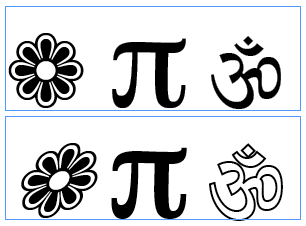
To fake a bold font, apply a thin stroke to the character in the Stroke panel. To fake an outline font, fill the character with Paper (in the Swatches panel) and apply a colored stroke to it. (That’s quite handy for making hollow checkboxes from Zapf Dingbats or other “pi” fonts.
Here’s three regular characters, then made italic (oblique, slanted), bold, and outlined.
Is this an abomination? Absolutely! Is it sure to make your art director squirm? Of course! Should you do it? Well, if you need the effect, and you can make it look good enough and get away with it, then sure!
 |
You can also create a condensed or extended face this way as well. Just be careful!!!
True, but you know, I find that its even easier to make really ugly type when stretching/squeezing. So I’d say be really, really careful. ;)
It is true that every once in a while you have to break a few rules (or noses) to get the job done!
Great post, David! I have a client who fell in love with a typeface I have called Poor Richard. When she started specifying italics and bold, I realized that since neither exist on my computer, I had to fake it by using the tips you showed in your post. I admit I felt a little queasy doing that, but now I feel better and am emboldened :-) to ask the following question:.
I know that when you oblique type, you use 20% skew, which works no matter what size you?re using. But is there a rule for adding stroke to bold something up? On the project I worked on above, I ended up with the formula of: Stroke weight=font size divided by 100. So 12pt type would have a stroke of .12pt. Then I?d increase tracking by 12 for the newly bolded type. I?d like to know whether you or anyone else has used a similar formula.
David, actually I think that 20 degrees is too much to skew most typefaces. I tend to find that 8 to 10 degrees gives enough differentiation without distorting the letterforms too much.
Back in the days, when I was actually a typesetter, we used to “faux oblique” type 12% to create italics on Quadex and Compugraphic equipment.
Yes, I’m a really old-timer from back in the Frank Romano days.
Thanks for the tip. But my zapf dingbats doesn’t have the om symbol. Shucks.
Nevermind. Found it in another ding font :)
On faking an italic, real italics tend to be about a 10-12 degree angle. Fake italics created by the OS tend to be 20 degrees, and look a bit goofy. Going any more than 20 degrees (say, to 25) is a really bad idea… unless the objective actually *is* to look awful.
Okay, I have been sufficiently chastized into changing my post above to 10-20 degrees (instead of 20-25, which is what it originally said).
Aleta: I don’t have any rule for how much of a stroke to use. I like your idea for a calculation; seems about right to me.
I don’t know if that’s entirely related to this post, but I needed to replicate a page which was originally designed in the 60’s. The font was very, very close to the Bodoni I have from Font Folio, but not exactly alike. So I created a character style with the variations I needed. For example, type size (somewhere between 9 and 10 pt) and type width (98%, although for some letters it could be 97%, 99% or even 101%). In that case, the skewing wouldn’t work for the italics, since they’re really different, but that version was available, and didn’t even need to be altered in any way.
YES! Finally someone else who admits making hollow checkboxes with fill/stroke effects on Zapf Dingbats :)
All the best,
Gero
I have another method for fake bolding that has an advantage for the font “Papyrus”.
Adding a stroke tends to smooth out the jagged edges that give “character” to the characters.
Instead, I make a copy in of the text string in-place and nudge enough at 45 degrees to create a thicker character. For larger sizes I might nudge 2 or 3 copies in different directions, but at a lesser amount, to get the best result. When I say nudge, I mean a tiny amount, just enough to get the job done. Watch out for pointed features looking doubled up.
Oh yeah — I forgot. I keep an old Power Mac around with OS9 and an old version of Fontographer. I have had occasion to fire it up and customize a font. I have created semi-bold versions that didn’t exist, but were really critical for the job.
Help, I’m upgrading to Indesign from Pagemaker…
How do you BOLD text?
Linda, you might consider getting a book like Sandee Cohen’s InDesign Visual Quick Start Guide, or check out the videos at lynda.com. You can make text bold in the type style menu, under the Font menu in the Control panel (when it’s in character mode), or in the Character panel. If no Bold appears, then there is no bold available in that font.
Will the fake italic be affected in the commercial printing?
OK, fake bold, italic, outline ? great. How do I fake a light weight?
I have a series of books which use Helvetica Neue Light in some levels of heading. We also use quite a lot of greek characters. Which don’t appear in (my version of) Helvetica Neue. They appear in Helvetica, but that doesn’t have a light face. Any easy way of faking it?
Don’t worry, I’ve found the answer here: https://www.layersmagazine.com/the-art-of-type-a-walk-on-the-wild-side.html
I was searching for the correct angle for creating italics in Photoshop and found my answer here. Thanks!
Am I doing something wrong? I added various sizes of stroke for comparison, and they look great in InDesign, but when I export to PDF for the printer, they all come out the same size. I just need a .1 stroke, but they are all at least .25, which is too overpowering for the rest of the text.
Thanks for the tip David. My font does not have bold font. Your trick worked like a charm. However, I am unable to make a character style with stroke applied. I could not find stroke option in Character styles. How can we do that? Thanks.