


Find-Change Scripting Goodness


FindChangeByList is a nifty script that ships with InDesign, for cleaning and formatting text. Its virtues have been extolled numerous times here at InDesignSecrets and on podcast #90. The script works by reading a text file containing a series of Find/Change routines, and executing them, one after another, in a flash. But one pitfall that I and others have fallen into while trying to use FindChangeByList, is that it’s very easy to make mistakes in formatting the text file that the script references. An extra tab, or a missing backslash, and you’re toast. Fortunately, Ukrainian prepress specialist and developer Kasyan Servetsky has posted two scripts on his website that take some of the pain out of FindChangeByList, and extend the concept with an even easier method.
The first is called Record Find Change CS3. Don’t mind the “CS3”, it works just fine in CS4 too. It was written by Martin Fisher, and works by translating your current Find/Change settings to a text file, perfectly formatted for use with FindChangeByList. All you have to do is set up the Find/Change dialog box with the options you want, and run the script. Then you copy and paste the results into the text file you wish to use with FindChangeByList.
The script turns this:
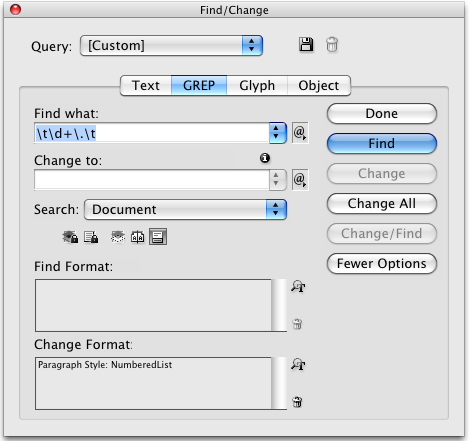
Into this:

The second script is one that Kasyan wrote himself. It’s called Find Change By Queries. It also works in CS3 and CS4, to capture the contents of the Find/Change dialog box (currently from the Text tab only) and write them to text files. However, this script doesn’t rely on FindChangeByList. It does all the work by itself, and interestingly, it saves each Find/Change routine, or “query” as a separate numbered text file that you get to name.
The script turns this:
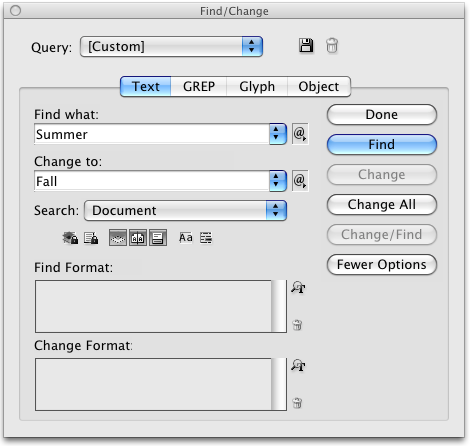
Into this:
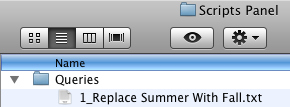
These numbered text files are saved in a Queries folder. You can easily change the order in which Find/Changes are executed by renumbering the text files. You can also control which queries are run by adding or removing text files from the Queries folder.
In addition to these great Find/Change scripts, Kasyan has posted several other interesting scripts for InDesign and Photoshop.
Check them out. I bet you’ll find something that can change your work for the better.
 |
Cool! It sure is handy that whenever I need something, someone I’ve never met anticipates my need and takes care of it. Thanks for the tip and thanks to the scripters for the scripts. I’ll be using them as soon as I get them installed.
Olaf
This is gold. My work often has projects where the text supplied is full of old-school formatting code which needs to be replaced with proper formatting and so far i’ve been using the findchangebylist.jsx to do this, but have had the complications of getting my coding wrong from indesign to the text file, so the first script here is just awesome. well done!
One of the numerous FindChangeByList Mod also can write in to a text file all query from your working file formatted for use with FindChangeByList
the FindChangeByList is a great tool, however it seems to crash if you overload the text file with search patterns. i made up like 2 pages of rules today and ID crashed when i ran the plugin.. might be due to my hardware, but who knows!
While findchangebylist is great, it’s much easier to use Automatication’s MultiFindChange add-on.
Agreed! Lucian, if you like FindChangeByList, you’ll love MultiFindChange.
I have been using the ‘FindChangeList.jsx’ script and it works well for what I need except for one thing: ideally I want to search for a piece of text with a certain character style applied. Is it possible to do something like
{findWhat:”Some text”, appliedCharacterStyle:”character style name”}
I did try the above but it basically ignored the character style and found all text matching the phrase. Any ideas?
Many thanks. HJ
Problem solved – I was making two mistakes. Firstly the style was a paragraph style not a character style and secondly it was grouped in a folder. So I moved it out of the folder and changed the code to ‘appliedParagraphStyle:’ and everything worked well. : )
Thanks. HJ
Hello,
I’ve been using RecordFindChange.jsx with FindChange by List etc. . . for a long time. But I’ve noticed that RecordFindChange.jsx records the find query, but not any formatting specified in the search. I.e. if I want to do a grep search for superscripted #s and apply a character style, it ignores the “superscript” setting. If I try using the text tab for superscripted text, again it ignores the character formatting.
It does recognize Underline: true – my guess is that the settings that have checkboxes work but not the ones with mini-dropdown menus. I tried typing “Position:Superscript” and “Superscript:True” in the search field of the script line, but the first crashed the script and the 2nd was ignored.
Anyone know how to include superscripting in scripted find/change? I can do this with regular find/change or multi-find/change but I like FindChangebyList because it’s easier to look at your queries if there is a problem and fine tune them instead of having to redo them.
I’m working on a newsletter at work, and for some reason when I started to work on the newest version, the FindChangeByList stopped working. I started to alter the scripts, but obviously have no idea what I’m doing… and now I’ve lost the default script settings. Can someone copy and paste them? I keep looking in forums, but this stuff is just way over my head, unfortunately. :(! So frustrated!!!!
@Brittany: You might find Multi Find Change from automatication.com much easier to work with! I agree that this is a difficult script to manage at times.
That said, if you need the “original” findchangelist.txt file, you can download it by clicking here.
Is it possible to write a script that will find and replace a compound word with half the word in italics?
This script seems to fail if I include “any white space” (\s) in the List file. Does anyone have any advice on how to make this work except the obvious – (~S| |~.) etc.
I see this is a very old thread, but I hope someone can help.
I want to record a series of queries, including the format, that I can run repeatedly for a particular job. I don’t like the idea of saving queries because I’d end up with hundreds very soon.
Do you know how I could or enter them in a spreadsheet type format? Or at least record a series of queries (Adobe-we need actions in InDesign!!) I downloaded the trial from automatication.com but I don’t see myself working well with that.