


Force First Line of Justified Paragraph to be Flush Left


Lisa wrote:
I’m using InDesign and I want to justify a paragraph, but the first line (the title of the paragraph) has to be aligned left.
The simplest solution is to break this into two paragraphs — a heading paragraph followed by a body para. But it sounds like you want them to be a single paragraph for some reason so? here’s a solution: Follow the heading with a tab and then a forced line break (Shift-return/enter).
For example, here’s the original paragraph:
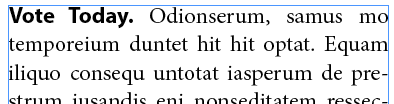
Now, here’s what we get when we put a Shift-Return/Enter (forced line break, or “soft return”) after the period instead of the space:
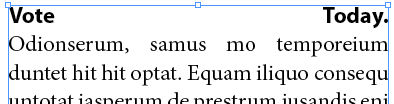
That obviously isn’t going to work! But if you put a tab character after the end of the heading (before the soft return) you get what (I think) you want:
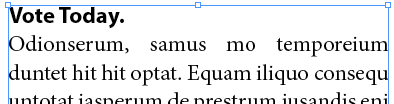
You don’t need to set any tab stops or anything like that; the tab character itself is all you need.
Note that the bold heading could be formatted manually, but in this case I’m using a nested style or a line style inside the paragraph style.
I wish there were a way to automate this trick in a paragraph style, but you have to manually insert the tab character. (You might be able to find a way to insert it quickly with a find/change, though, depending on the formatting of your headings.)
 |
Wouldn’t a Nested Style would work here beautifully? Define your bold heading Character Style up to one “.”.
I do something similar when I want the last words of a left-aligned paragraph to align right, say for a credit at the end of a caption. After the last word of the text that you want to align left, enter a shift/tab. The rest of the text on that line will align right.
You could also use Flush Space/Soft Return, but it really doesn’t improve anything since the tab key is much handier.
Personally, I’d use a right-align tab (shift+tab) as a default, since it would work with any kind of alignment – who knows, someone may need this with a flush-right or even centered paragraph… And as Tina said it comes handy with right-aligned last words.
I don’t see the advantage of this over using a “hard” return and a separate style for a heading.
@Tim: Um… I, too, would normally use two paragraphs; but people have all kinds of reasons, and in this case that was what Lisa needed.
It’s slightly less work putting in a tab than having loads of separate paragraph styles.
I found this article really useful by the way. Thanks!
In this particular case I would have just used a hard return with a justify left. However if she needed to use the soft return then maybe there should be an added feature to InDesign to allow that?
love this option. tx!
Nice article, David. Worked like a charm!
UNFREAKIN’ BELIEVABLE!!!!!!!! THANK YOU, THANK YOU, I will pass this on to my students. Designing a 107 page magazine and was in a real bind. SO APPRECIATED!
Thank you so so much! Was at work and didn’t know how to fix this issue and my boss was annoyed…thank you so much!
Tab doesn’t work when the title is more than two words long.
This really helps me a lot
Wow saved me hours!!! Just great thanks a lot it does work for hebrew text with align right as well. Susanne
Thanks a lot