


Get Your Old Scripts Running Again with “MakeItRun”


Needing to quickly split up a long InDesign file into individual INDDs, I turned to a favorite old InDesign script, Extract Pages (see post), but was having no luck. After some investigation I learned that the script was simply too old; it would work in CS3 or CS4 but not CS5.5.
This was not because CS5.5 has an “Extract Pages” built-in (it doesn’t), but because Adobe changes internal scripting rules from version to version. If a script refers to a certain object or process using an “older” name or with a deprecated method, it will likely fail in the current version.
Unfortunately for me, the script’s designer/developer, Loic Aigon, was not able to update the script for later versions, as he said in the comments of the Scriptopedia page I linked to in my post about it. I even tracked down his web site but just found the same CS3/CS4-era version.
I thought I was out of luck, until kind-hearted scripter Martinho da Gloria (developer of LayoutZone and Multi-Find/Change) sent me a neat little freebie he wrote on the spot: MakeItRun.
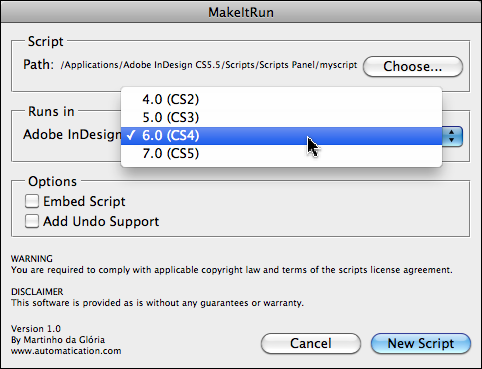
Make It Run is a cross-platform script that runs an old InDesign script using the older scripting engine, but within the current (CS5/5.5) version of InDesign.
It runs the old script by creating a new script you can name and save in your InDesign scripts folder. You can either have the new script point to the older script, or you can embed the older script completely in the new one, making it self-contained. Whichever method you choose, it doesn’t affect the running of any of your current scripts, they’ll all still use the current scripting dictionary and routines.
MakeItRun probably won’t work for every orphaned script out there, but it’s worth trying. The good news: I was able to get Extract Pages to run just like before! Thanks Martinho!
Download MakeItRun from Martinho’s site, Automatication. It’s free, but if you find it useful, please support his efforts by clicking the “Donate” Paypal button on that page.
 |
Note: InDesign does have a “Move Pages” command (in the Pages panel menu) but you’re limited to adding one or more pages from the current file to a single existing, open document. The Extract Pages script works like Acrobat’s Extract Pages command, it can create new, stand-alone files from pages in the current file.
I still use the “Version 4.0 Scripts” Folder Trick to get old scripts working in newer InDesign Versions.
But MakeItRun would be very helpful!
Hi Anne-Marie,
It’s great ! Sorry I never could update ExtractPages but this is why scripting is awesome, there are always workarounds :)
Just one thing, it’s aigon, not aignon ;)
best,
loic
Loic, thanks for the correction, I’ve updated the article. (This is what happens when you’re writing at 6:30 a.m….)
:D
one of the things Martinho did with this script is give you the ability to add “undo” support option… a lot of old scripts don’t have this included… and it’s worth updating them, even if you already have them working by using the Yves trick ;-)
Hi Cari,
you are right. “Undo” is one of the reasons to use this new method.
Looks promising,
finally possible solution to clean up a little ?Version X.X Scripts? Folders mess.
This is great. Thank you so much for sharing with us..
cheaplouisvuitton-store.net/
I have a query regarding compliation of text objects.
I have a large booklet with many individual entries of text. Can you extract each of these individual objects to create many seperate PDF documents? and potentially visa versa.
Tim
Anne-Marie, I finished your lesson on fixed-layout EPUB on lynda.com, which was incredibly useful, but I am having a horrible time with this script. I’ve tried exactly what you describe here, and I keep getting:
Error: No file is associated with the currently active script. I tried embedding the script, I tried choosing ID 6.0 (CS4) and then 7.0 (CS5) from the “Runs in” pick list, and nothing is working. I can’t think of why this won’t work as described. Do you have any suggestions? Thanks.
I broke down and exported my ID CS6 file to .idml and ran the script through CS4. Didn’t work in 5 or 5.5, I’m afraid.
fantastic, but i tryed to used that with cs6 (with extractpagesCS5.jsx script) and it’s dont works… someone has a way?
For those of you that are trying to make this script run on InDesign CS6, I asked the developer by email (Martinho da Gloria) and you just have to select InDesign CS4 in the MakeItRun panel. It works perfectly then! :-)
This article and script just saved my butt.
Comments, too, especially Thomas Rüesch.
THANK YOU ALL!!
I have been trying to get this script to run in 5.5 & 6. Neither are working. I tried selecting CS4 as Thomas Rüesch said and this did not work either. Does anyone know why this is not working or another way to get it to work? I have several large documents that I need to convert to ebooks.
This may be too late to help everyone, but I opened the extractpagesCS55.jsx script in TextWrangler. I then changed two things in the code. Anything that said Adobe InDesign CS5.5 I changed to CS6. I then Saved As etractpagesCS6.jsx.
It then worked. I did not have to use MakeitRun.
Cannot make extractpages_cs6 run. get this error…
Object is invaid
Line 185
source: doc.pages[i].remove();
How do I fix it???