


Help! I’ve Lost My Serial Number.


Every now and again, I’ll spot a post on the User to User Forum from someone who’s misplaced the cases that his/her software came in and now want to install on a new machine or just got a laptop for travel and wants to take advantage of the two allowed concurrent activations.
As long as the software is available, installing is easy, but activating it without a serial number isn’t going to happen.
Before I get into a little trick to find the serial number on a machine that’s already running allow me to step up on soapbox and point out that the best way to avoid problems is to register your software online IMMEDIATELY after installing. You’ll need a free account with Adobe but this will assure you of access at any time to your records.
If you didn’t do that, here’s a little trick originally posted by forum contributor Peter Spier to use when you’re in a pinch. Just deactivate the software. You’ll find the deactivate command under the help menu. (note: it may take a minute or two to become available) When you begin the deactivation process you’ll get a window that will contain a check box to remove your serial number. DON’T CHECK IT.
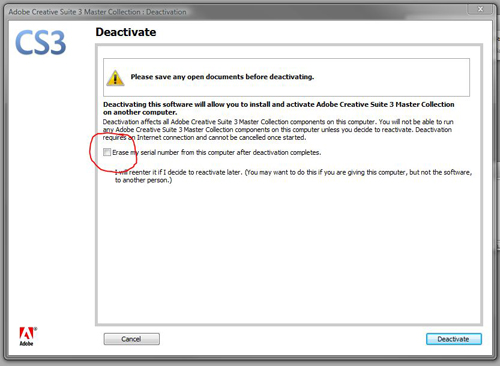
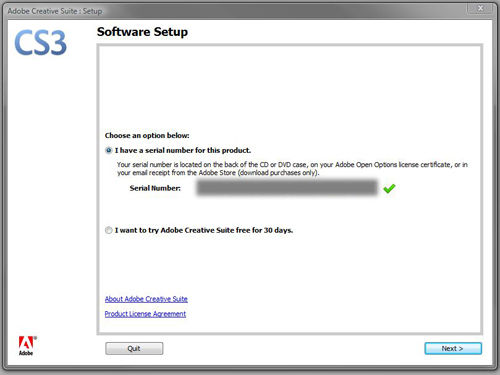
Once you deactivate, the application will automatically close. Upon relaunching, you’ll be greeted with the activation wizard with your full serial number already filled in.
And to repeat my earlier advice, once you have this taken care of please register your software with Adobe. You’ve invested a lot of money in it and registering the product is the best way to protect that investment.
One final note, this will use up one of your twenty activation/deactivation choices which I wrote about here.
 |
Bob is absolutely right that you should register your product with Adobe. You can go to the Adobe website to see your registration number.
The problem is if you have MULTIPLE licenses. It doesn’t tell you which serial number is installed on which computer. (Of course, the highly organized will keep a list matching serial numbers and workstations, but most of us….)
That’s where Peter’s excellent tip comes in handy!
I’m flattered.
And as far as using up the activations, I’ve done that, once, or something similar with a hard drive crash, and I called the phone number that’s also available in the dialog. The person on the other end was very nice, asked why I needed to reset the activations, and got me back in business in about three minutes. Honest folks have nothing to fear from activation.
Steve, for the multiple licenses you can retrieve a partial serial to determine which license is used on which workstation if you have the Suite. This trick doesn’t work for stand alone InDesign
1) Launch Illustrator or Photoshop CS3 application.
2) Go to Help > System Info
3) Scroll down to Serial Number, it will be after the OS and User Name entries.
4) This line has the first 20 digits of the serial used to install the suite.
But how can you get the last 3
Years ago I created a simple little FileMaker database with three fields — Software Name and Serial Number and Date. I enter every new application I install, and it has saved my life many times as I have moved to new computers. And, of course, there are lots of inexpensive programs that do the same thing.
I tend to list the software name, version and serial number in my address book. Always accessible, like a phone number as well as being synced and backed up regularly.
I had the problem of not having my CS3 serial handy when I wanted to install the Fireworks CS4 Beta at home, and was sure the serial shown in Illustrator and Photoshop’s System Info dialog was correct.
When I got onto Adobe’s live help chat thingamajig the person I got ‘help’ from didn’t tell me it wasn’t the complete serial but did know it wasn’t valid (duh!) so I still had to drive to work to pick up the serial.
I thought about deactivating and re-activating, but decided not to as I didn’t need the serial right away.
Saving the serials in one location is a good idea. I think I’ll use Google Docs for that as then it’s available everywhere I need it, in case I need the info at home while the software’s at work or vice versa. It’d also help save the info on whose name it’s registered to (I tend to register or order on multiple addresses).
Thank you for the help!
Thank you! This is exactly the info I needed! We have a number of legitimate copies of CS3 and they’re just on the wrong computers but we’ve lost the original boxes. Thanks again.
Can some one confirm whether this works for CS4? I did it with CS3, but I am not getting the activation screen when I restart CS5, so I can’t see my Serial Number.
I think CS3 was the last version this would work with, sorry.
Is there a trick to getting the computer to show the serial number on CS4
I have several sets of it. One is on my desktop and a laptop that has almost died. I got a new laptop and want to use the one from the dead one to the new one.
Adobe live chat couldn’t help.
Thanks
No. There’s no way to show it in CS4. To make matters even more complicated, it’s stored scrambled in CS4…
In CS5 it’s possible to show the serial number using a one-liner script:
alert(app.serialNumber)However, it only shows the first 20 digits (out of 24).
I know this post is old but I SO need an answer ….if I deactivate it, will I have to reinstall the software to REactivate it? I don’t have the discs at home with me but am trying to install CS5 on a new iMac and take my CS3 serial number from my old iMac ..but again, the original box is at work and it’s the weekend.
So, can I deactivate and reactivate without needing the discs to reinstall?
Thanks, in advance ;)
You can activate and deactivate at will. Deactivating doesn’t uninstall the software.
To install the CS5 upgrade you only need the serial number from CS3. The installer won’t be looking at the activation status for CS3, only for a valid serial number.
I am trying to find this deactivate button to get my lost CS3 serial # so I can upgrade to CS5, any idea where under the help menu it’s supposed to be? I waited more than 2 minutes and there’s no “deactivate” showing anywhere.
@Cyril: Do you have an individual license? If so, it should certainly be under the help menu.
p.s. my CS3 version is 5.0.4
@Bob Levine
I’m not sure what license type I have to be honest because I installed CS3 years ago along with photoshop, dreamweaver, etc. (package), and have since migrated computers, moved office, etc. I didn’t realize there were different types of licenses. Either way, the only items I have under help are : InDesign Help, Welcome Screen, Registration, Updates, Online Support, InDesign Online”.
Volume licenses don’t have activation but they’re also not eligible for upgrade to single user licenses.
Ah, I see. Ok, thanks. I wonder why adobe didn’t tell me this after being on the phone with them for over 2 hours and getting transferred 3 times.
Nowadays, customer can upgrade from Volume License to single-user license, but this is not really advisable unless you will take the burden of doing the Unlocking process everytime you will install the Upgrade version. Eventhough you have a valid previous qualifying version serial number, that serial number will not work because it is under the volume license program. So the last resort is to contact Adobe Customer Service to unlock your software so you will be able to activate it.
I just tried to find my registration number in CS5 using the Deactivate instructions. It did not show the serial number. I didn’t use the deactivate permanently option, but what can happen to my CS5 now? How do I re-activate it? I opened up Illustrator just fine, but will it end? Also I still don’t know my serial number… to register it.
Unfortunately this only works with CS3. CS5 does the activation in the background.
If you successfully launched any app in the suite and it worked, you’re fine.
So if I am reading these posts correctly it is impossible to get the serial number from a runnning CS4 version?
I went to system info and received only a partial
The download from adobe is too old to retrieve, they now wnat us to prove a purchase from 3 years ago?
@al,
Did you register the software? If so, log into your Adobe.com account and you’ll find the information there by clicking on “My Products” under the My Products and Services section.
So how do I find it for CS5? I saw the script… but where do i enter that in? So confused, please help
@Aschmalz: This article was written for CS3. Same response to you as to the poster before you:
Did you register the software? If so, log into your Adobe.com account and you?ll find the information there by clicking on ?My Products? under the My Products and Services section.
I did not register it. Am I stuck then? or is there anything i can do?
I know of no way to get that number. That’s not to say one doesn’t exist, but as I pointed out in the original article, this is why you should immediately register the software.
You can try contacting Adobe if you bought directly from them.
I went back in and registered it, then it showed up under the My Products page! Woohoo! So apparently it doesnt matter when you register it? Just as long as you do? Is it really that easy of an answer?
worked like a charm, thank you!
But I can’t register, whitout the serialnumber.. And it is my serialnumber I need??
RE Harbs post:
January 31st, 2011 ? 1:29 pm ? Link
No. There?s no way to show it in CS4. To make matters even more complicated, it?s stored scrambled in CS4?
How do you make/run this script work???????
In CS5 it?s possible to show the serial number using a one-liner script:
alert(app.serialNumber)
If I remember correctly, if the software is installed you can find a link to register under the help menu in CS3.
Thanks Bob, but I was asking about how to run that script for CS5 revealing the first 20 numbers….
In CS5 it?s possible to show the serial number using a one-liner script: alert(app.serialNumber)
A co-worker’s Mac was upgraded to CS5 last spring and I can’t figure out which serial # and hence copy she’s running. If I had even 20 characters I’d know.
It’s such a pain on Adobe’s part for not allowing legal users to double-check the #s of the copies they’re running.
When machines get wiped, hard drives go down, and old Macs are passed down the food chain, licenses get upgraded over 5 generations, it can get really confusing for law-abiding license users to keep track of all their copies. I can call Adobe and check registration dates and HOPE that I can figure out which of 5 upgrades this was for.
Fairfax
RE CS5 Serial # Script:
Adobe helped me figure it out based on installation dates.
Thanks All,
Fairfax
hi there smarties,
i’m stuck. i’m at my (relatively new) job and my boss wants me to upgrade from CS5 to 5.5. sounds good, but i need the serial number from 5, which she has no idea about. i read the conversation you’ve been having and am wondering… this command – alert(app.serialNumber) – will that work? if so, where do i put it to make it give me what i need?
also, the boss thought the person who installed DID register, but just found out they did NOT.
any help is greatly appreciated.
thanks a bunch!
What about CS2? Is it available through the deactivation process?
I don’t even remember if you could deactivate CS2. Look for an item in the help menu for either deactivate or transfer activation.
Hi, I have CS3 on old computer (Vista Business) and have installed it on new computer (Win 7 – 64 bit). The old computer deactivated ok, and the serial number was displayed. When the serial number is entered on new computer, there is a red cross displayed at the end. This indicates to me an invalid number. I’ve triple checked the number on both old and new computers. Does the Win 7 version have an impact ?
Hi there! Many thanks for the info. I followed the instructions here of deactivating without the check mark, but upon re-launching the app, nothing happened at all; as if I didn’t even deactivate. Any reason why?
Regards,
PS. I’m working with Photoshop CS4
CS4 and later activate in the background as soon as an internet connection is detected.
I like indesign so much
i was fill my registration form before 5 months but till now i didn’t found my registration latter..please sir can u told me how i can found my registration number…
Is there any other way to get hold of the serialnumber? The CD is lost and the person who ordered InDesign CS3 has quit.
Tried the script but that doesn’t seem to work on CS3
I dont get this deactivate under Help menu, waited more than two minutes and still not showing.
I’m pretty sure that the software isn’t registred and I guess that not standard to do in this hospital.
It could be a volume license which would not require activation. If that’s the case I’m afraid I don’t have an answer for you.
i have lost my photoshop cs3 serial number.. Pls help me
i lost my cs3 serial number. halp halp hlp me……
If you have already signed up to Adobe ID you can log in at adobe.com and view your recent purchases; in this list you can view the serial number, even for upgrades.
I don’t know about serial number of Adobe Indesign cs6. Could you help me please?
@Piseth: log into your Adobe account online and you’ll find all of your registered software, including serial numbers there.
Hi,
I’m trying to follow these steps. I opened my Adobe application, then went to the Help -> Deactivate. It asks me whether I want to stop activation or deactivate permanently. Which one do I choose?
I have CS5 on a Mac. (Nt sure if this info makes a difference.)
Thanks so much!
This won’t work for getting a serial number for CS5. If you need your serial number, log into your account on Adobe.com and you’ll find all of your registered programs and serial numbers.
Hi
I lost my case cover that had the serial code on it..I never got a chance to register anything..it’s still brand new!! Help!! I just have the cd drive that came with my software.
If you have a proof of purchase you can try contacting Adobe but short of that I’m not sure what you can do.
Hello
Am using adobe cs3 installed on 10 computers on a network but when i mistakenly used adobe photoshop cs4 portable on one of the computers, the whole adobe cs3 suite got expired and its requesting for serial number. How do i activate it on this single computer?
Thanks.
Hello: When I was in school… I bought a full version of CS5 from Academy Super Store… I still have the receipt… In Dec. 10th, 2010 I installed in on my macbook pro… a year ago the monitor shattered… I recently bought a new iMac. I tried to transfer the applications from my macbook pro… It keeps asking me for my Adobe Creative Suite Serial Number, which I had, and it was sent to my old email before the divorce. My father has since then shut down the account and the email address no longer exists… Since the move, I can not find the start up disk with the serial number on it… I contacted Adobe, explained the situation, emailed them my purchase receipt and they STILL will not give it to me. They said the only way was to send it to my old email, which again, is 2 years way gone… I paid legally for this legal copy, which although I got the student discount, it wasn’t cheap! And, I send them the darn receipt and told them to call the Academy Super Store, sent them my ID… no go… they won’t send it to me… what do I do, I can’t afford to upgrade, we just moved. Although my laptop screen is broken, I was able to hook it up to an external monitor through a bunch of adapaters… I tried to copy it to my new mac (also registered under my name, the same name as my laptop) and bought both from the Apple store… I’m at a desperate loss what to do… please help, asap… new computer was $2,500 and is USELESS without it…
Hi I am in a very similar situation as you. Please let me know if you were able to find a solution. Thanks!
You can locate the serial number for Adobe Fireworks on the hdd it was originally installed on by going to: Users/Shared/Adobe/IOS-19770/Fireworks CS4-Fireworks-CS4-Mac-GM-en_US.swtag or just search your system for: “.SWTAG”.
Select “Show All In Finder” then right click on it and select “Open with” and choose “Other”. Then choose the “TextEditor” or any other text editor.
Your 24 digit Serial Number is located near the bottom of the file in brackets and will look something like this….
123412341234123412341234
You can then use the serial number to register Fireworks on your other computers.
This is more what the code looks like that contains your 24 digit Adobe Fireworks serial number. I forgot to add the spaces in the tags which are obviously excluded in the comments.
Also, this will only work on machines with a registered product, not the trial version. This is helpful if you misplaced your serial number and want to install Fireworks on another computer.
FILE EXTENSION NAME = .SWTAG
FILE LOCATION = USERS/SHARED/ADOBE/ISO-19770
The following is found at the bottom of the file…
activated
RETAIL
RETAIL
123456789012345678901234
You. Mr Ken are a legend. Thank you so very much!!!
I called Adobe – they were not helpful. This is the answer I have been searching for.
What if the de-activate button is greyed out?
Hi Bob,
Thank you for this post. I have Adobe CS4, the student edition. I have the software box with a number on it but it doesn’t appear to be a serial number, because there are a different amount of number strings versus the boxes requesting the serial number in the program. I have a MacBook Air, and am not able to load the software through a disk drive, so I downloaded it from Adobe. When I try the trick you have listed above on my iMac, my software deactivates, but when I restart it, it comes right back on without showing any serial number. I am not even sure I can use the software again, because I loaned the second use to my son and the computer he loaded it on was stolen. Any ideas? I am pretty sure I registered my software, but think my email that I had when I bought the program is defunct. Thank you!
Our old IT guy ran off with all my software; so when I needed my serial number today I was so glad to find this page.
I’m running CS4 on a PC and found my serial number here. If you’re on a Mac the address will be different:
C:\ProgramData\Adobe\ISO-19770\Creative Suite 4 Master Collection-MasterCollection-CS4-Win-GM-en_US.swtag
On my Mac, running Yosemite 10.10.5, I was able to track down my CS5 serial number by following the following file path:
Macintosh HD / Library / Application Support / regid.1986-12.com.adobe
and then selecting the appropriate file for the CS instillation I was looking for. In my case it was regid.1986-12.com.adobe_DesignSuitePremium-CS5-Mac-GM-en_US.swidtag.
Open the file with a text editor.
The serial number was listed, in full on the last line of this file.
I had a lot of other files in this folder that all pertained to different free trials of adobe that I had installed.
It is unclear to me if this folder was created when I downloaded adobe creative cloud, and then the files relating to older instillations were created, or if the folder was there all along. If you don’t seem to have the folder I would recommend downloading a free trial of adobe CC and seeing if that creates the folder for you.
THANK YOUUUUU. I have been trying to figure out this for ages, never being able to get the full 24 digit code. Thank you!!!
could you help me about my serial number for cs2 and cs3
My daughter downloaded a trial of Aftereffects on her Macbook pro to use along side CS6 which she had been running without issue for 3 years. A box popped up asking her to close Photoshop which she did and now Photoshop will only run as a trial. She doesn’t remember her email used for purchase ( nor did she register the product!) Adobe unable to help. Any suggestions gratefully received!!
Hi!!Is this still working?I’m afraid to deactivate and the number not appear when I’m lauching again. :-(
I’m running CS4 on a PC. Found my serial number at the address below. If you’re on a Mac the address will be different. In that case you could try a search using *.swtag.
C:\ProgramData\Adobe\ISO-19770\Creative Suite 4 Master Collection-MasterCollection-CS4-Win-GM-en_US.swtag
Good luck!
My one is the CS4.
I’ve CS6 installed on Mac laptop. But my desktop PC crashed. Need to install CS6, but need serial #. Software bought in 2012 while studying photography. Need anyone’s help to locate serial # on Mac laptop. OX 10.9. Thanks
Joe, you could try what I suggested above to Janaina. Good luck!
Hello,
My mac book pro os x maverick, hard drive disappeared, they had to reload the operating system – Now I can’t install my CS3 and some other software. I do not have the serial number as it is so old. I tried to deactivate and do what you said above, but it was greyed out. What can I do ???
Help, Please…Dreamweaver, illustrator and bridge installed, but Photoshop, put me on a trial without the serial number.
I have tried the above method for our CS5.5. It showed a serial number, but it doesn’t work. Adobe says it should start with 1, but the one I found starts with 9. Can you help at all?
I have this exact problem. I found the serial number, but it will not work.
I had CS6 and have lost my serial number. How can I find it?
SIR ITS WORKING.
SUPER SIR