

InDesign Poster Details
|
InDesign Keyboard Shortcut Posters for Mac OS X/Windows
Designed and produced by David and Anne-Marie in between podcasts!
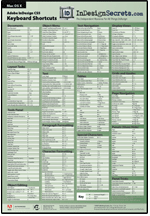 Ready to go pro? Hang this beautiful, four-color poster near your computer and you’ll never be keyboard shortcut-less in InDesign again! At a generous 18″ × 26″, we had plenty of room to include nearly all of InDesign’s keyboard shortcuts in logical, easy-to-read groupings.
No more hunting through Edit > Keyboard Shortcuts to see which ones Adobe didn’t include in the menus. We even included the mouse/keyboard combination “techniques” such as drilling down through the stacking order, rebuilding preferences, autoflowing text, forcing a screen redraw, and more.
We’ve been producing these since CS2, and have a few of the old ones left to give away at our events. All share the same basic design, but each comes in a distinctive and handsome color.
Download Today!
Now CreativePro premium members can download a PDF of our keyboard shortcut poster!
Sorry! You’re either not yet logged in, or you don’t have an account with CreativePro. Please log in above, or get your membership today! |