


Make a Font “Contact Sheet” in InDesign


What characters are hiding inside that font you’re using? There are likely some glyphs you don’t know about — hidden fractions, or ornaments, or odd ligatures. Wouldn’t it be cool to get a specimen or contact sheet?
Eric Menninga (one of the lead engineers on the InDesign team) came up with a clever script to do just that. The script writes a temporary tagged text file to disk with the desired characters in it, then places that file into a new InDesign document. You can choose the font and the beginning/ending glyph id numbers.
Unfortunately, when Eric sent it to me, there was no user interface. He was comfortable just editing the script each time he wanted to use a different font, but it troubled my delicate sensibilities. So: Chuck Weger — scripter and workflow consultant extraordinaire — came to the rescue, editing the script and giving it a little UI.
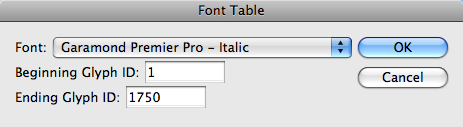
Choose the font, choose the range of glyphs you want (many fonts only go up to 300 or so, but some OpenType Pro fonts have thousands!) and click OK. The result show up in seconds:
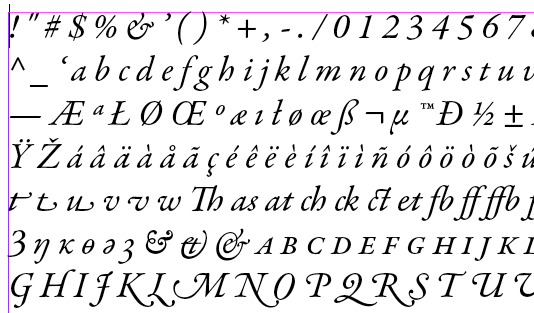
If you need to know a Unicode or Glyph ID (GID) number for a character, just open the Glyphs panel (Type > Glyphs) and select the character in the text frame. The same character gets highlighted in the Glyphs panel. Hover the cursor over it and you’ll get details on it. Alternately, you can load it into the Glyphs tab of the Find/Change dialog box.
The script should work in CS3 and CS4. We think. You can download the script here. [Update: Here is a version of the script that works in InDesign CC]
Thank you to Eric and Chuck!
Making a Font Specimen Book
If you were looking to make a font catalog — to show a sample of every font in your library, for example — the above script will not help you. Instead, if you’re on the Mac, you want to take a look at Chris Paveglio’s InDesign Font Catalog applescript. There are likely other good font catalog tools out there, but I haven’t seen them. Suggestions from the audience?
 |
Now I can see all those flourish-y characters in Bickham Script. I love it. :-)
Thanks, Phyllis
Useful! Is there a way to know how many glyphs a font carries so you can accurately enter the ending glyph ID? Typing in a glyph ID number that is higher than the highest glyph in the font results in lots of the X’d red boxes.
The Mac Font Book utility (included free with Mac OS; it’s in the Applications folder) shows the number of glyphs when you select it an choose Preview > Show Font Info; the total number of glyphs is listed on the last line.
Kind regards,
Bill Carberry
Adobe Certified Instructor
https://aci4hire.com
Adobe has one for free:
I modified it a few years ago to do a custom font sample book for our customer.
@James: for some reason that URL didn’t work, so I took it out. You’re right: The Exchange has several different font book type scripts for InDesign. I haven’t tried them yet, but they include:
Font View/Tester
Font book
ID Font Catalog
Brad: Great question. I know of a manual way:
1. Open Type > Glyphs panel
2. Choose the font in question from the bottom of the Glyph panel
3. Choose Sort Glyphs > By CID/GID from the Glyphs panel menu
4. Scroll to bottom of Glyphs panel
5. Select final glyph and look at GID number in its tool tip. That’s the total (highest) GID in the font, I believe.
I tried it with Adobe Caslon Pro Regular and the final GID was 800; when I switched to Century Gothic Regular, the final one was 244.
The Font book InDesign script works well…
If you restrict yourself to OpenType and TrueType fonts (which is rather logical, as these are the ones with interesting glyphs), you can read the number of glyphs if you know the file format.
… Hey … but I know the file format! So I whipped up this script. It’s a stand-alone, I leave it to the writer of the original to integrate it.
myFile = File(app.selection[0].appliedFont.location);
myFile.open(“r”);
myFile.encoding = “binary”; // Important!
// Read TTF/OTF header
hdr = getUlong(myFile);
if (hdr != 65536 // Microsoft Truetype
&& hdr != 1330926671) // Adobe OTF ‘OTTO’
{
myFile.close();
alert (“Not a font type I can read…”);
exit(0);
}
numTable = getUshort (myFile);
/* Already read:
ul version
us numTable
Skip over
us searchRange
us entrySelector
us rangeShift
to get to start of tables:
*/
myFile.seek (12);
/* Find ‘maxp’ — maximum profile */
/* Each table entry is
ul tag
ul checksum
ul offset
ul length
*/
for (var t=0; t<numTable; t++)
{
tableEntry = myFile.read(16);
if (tableEntry.substr(0,4) == ‘maxp’) break;
}
if (tableEntry.substr(0,4) != ‘maxp’)
{
myFile.close();
alert (“No ‘maxp’ entry found–yuck”);
exit(0);
}
offset = (((((tableEntry.charCodeAt(8 ) << 8 ) +
tableEntry.charCodeAt(9)) << 8 ) +
tableEntry.charCodeAt(10)) << 8 ) +
tableEntry.charCodeAt(11);
myFile.seek (offset);
// Should be 0001.0000 but is sometimes different…
// Let’s ignore that, shall we.
version = getUlong (myFile);
NumberOfGlyphs = getUshort (myFile);
alert (“NumberOfGlyphs is “+NumberOfGlyphs);
myFile.close();
function getUshort (aFile)
{
var result = aFile.read(2);
return (result.charCodeAt(0)<<8 ) +
result.charCodeAt(1);
}
function getUlong (aFile)
{
var result = aFile.read(4);
return ((((result.charCodeAt(0)<<8 ) +
result.charCodeAt(1))<<8 ) +
result.charCodeAt(2)<<8 ) +
result.charCodeAt(3);
}
I publish a magazine and I often find I have to match fonts in an ad that’s sent to me. I’m looking for a way to sort all my fonts in ID3 so that I have all the Serif fonts together, all the San Serif together, handwriting fonts etc. This would make it much quicker to identify unknown fonts. Is there a script that could do this?
@Mick: No, but that’s what font management utilities are for, such as Insider’s FontAgent Pro, Extensis Suitcase, or Linotype Font Explorer.
There are also font identifier sites out there, such as WhatTheFont and Identifont.
@brad
@anne-marie
use a high number, like 5000, put your cursor in the first red box and command+shift-end will select all, delete, and you don’t have to figure out the last char ID
Would you kindly explain where I can find “Font table” in Indesign CS5?
Thank you very much!
@Yuki: You can download the script above (use the one for CS4; I think that works in CS5 and CS6, too). If you need help installing a script, read this: https://creativepro.com/how-to-install-scripts-in-indesign.php
Chuck updated the script to work with InDesign CC, and that is now available in the article above, too.
Hello!
Thank you for such tip! The FontTable script works like a charm! Do you have any idea how would be possible to sort the result out a bit (excluding manual refining)?
Instead the CID/GID order begin with the classic alphabet:
abcdefgh…
ABCDEFGH…
and othe glyphs follow
Thank you.
Thank You very much! I finally found what I was looking for.
I am Arabic type designer and found your nice script by searching …
I apply it, it is very nice ..
But it is not that good in Arabic … Because when the glyphs were inserted, the script inserted them from Left to right.
Is there another version of it, to write from write to left ..
for example:
you
beh beh.init beh.medi beh.fina … so no connection between Arabic letter …
I want it
beh.fina beh.medi beh.init beh
Can I get this script to do that …
That will help me to do my font sheets …
thanks
Hasan: Are you using this script in a ME version of InDesign in a text story that is set from right-to-left? Or using the worldTools plugin from In-Tools.com to change the type direction? I don’t know if this script will work right-to-left. I have not seen any other scripts that will do that.
I am using this script in a ME version of InDesign in a text story that is set from right-to-left?
But when I applied the script the result was from left to right as I explain.
This script is great for latin font.
Any chance to do for Arabic font …
I paid $15 for Chris Paveglio’s InDesign Font Catalog. Never got it, his mail address doesn’t work and the website https://home.ptd.net/~chrispav does not exist.
Any ideas what happened? A scam?
Hi Erik- I’d try another mode of contacting him. He seems to be active on Twitter https://twitter.com/ChrisPaveglio and here’s his LinkedIn page: https://www.linkedin.com/in/chris-paveglio-99b43044
Thanks, I’ll try those