


Modified Script Adds Captions From Clipboard to Images


Some of you may have experienced the LabelGraphics script that ships with InDesign. It’s a very cool script written by Olav Martin Kvern that lets you quickly create captions for all the images in your document. The captions can be based on each file’s name, file path, XMP description, or XMP author. (XMP is the metadata that you can store in images with Bridge or Photoshop.)

But as much as I like the metadata workflow, that’s not where most image captions live. Usually, someone has typed an image caption into an email, or a Word document, or some other place. How to get those captions in the right place? Fortunately, the scripts that come with InDesign are meant to be used as examples — starting points for modifications — and Steve Wareham (who you may recall wrote the great swatch-switcher script) rose to the challenge.
His new script, LabelGraphics_mod.jsx, adds a couple very useful features beyond automatically making a label text frame (and putting that text frame on a new layer named “labels”):
- An option to paste the current clipboard contents into the label frame (yay!)
- Automatically expanding the height of the clipboard to fit the caption
- It will work on one or more selected images, or (if no items are selected) it offers the option to create labels for all the images throughout a document
- You can change the fill color of the text frame it creates
Here’s a look at its new dialog box:
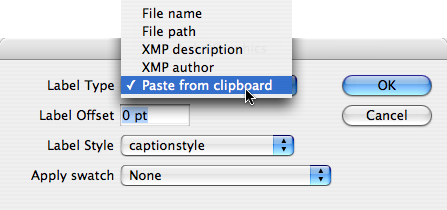
This is a great improvement, and a great hail of thanks goes out to Steve for his work. You can download the script by clicking on this link. We’d love to hear what you think of it!
 |
nice one, many thanks
nice. I didn’t even know about the original version of this!
Wow! What timing ? I was able to use this is a publication today. As always, David, your knowledge about ID is phenomenal. Thanks for sharing the wealth.
Label Graphic is a great script. This one is awesome! I could run it sometimes, but since some weeks ago, I have a problem with some scripts: they just don´t execute. I´ve not installed any extra plugin or anything in InDesign. The same scripts work well on other computers. Any suggestion?.
Some people find that when their scripts stop working, rebuilding their preferences seems to helps. See our Popular Posts/FAQ for more on how to do that.
Just tried the original sample script that ships with ID. I can’t get the ordinary version of LabelGraphics.applescript to work. I get an error message that the script doesn’t understand a command.
But when I use the contextual menu (installed by the second script) I can get it do work.
I love the idea of using the XMP data.
Also, the File Name in the LabelGraphics script is the Finder file name, not the File Title in the XMP data.
This works great. I wish I had looked ages ago. Didn’t even explore the scripts panel.
Now, I’ve had a close look a the script, and they all look very frightening to a non-scripter. So, how do you turn this into a context menu.
PS How, also, do you remove the labelmenu (original)? The Applescript removelabelmenu doesn’t remove the javascript one.
I have a flash website
i’m looking for the script who makes google ads on flash.
where can i get it?
Works great .
Is it possible to label the graphic without the extention(.jpg, .tif ) . Can someone help me here please.
To Pascal Trouvé:
First, make sure your pictures to be labelled are situated on the layer OTHER than Labels.
Fulfil the script.
Temperarily turn off all the layers except Labels.
Use GREP to remove unnecessary file extensions.
In Find field type:
\.(jpg|tif|gif) (include whatever you can figure out)
In Replace field type nothing.
Leave the field Include Hidden Labels off.
Press Replace all.
Hi
This is a great script and one that works well with InDesign CS4. Question I have is whether anyone knows of a script that could do a similar thing with custom field XMP metadata?
Thanks
Richard
If the XMP metadata has been edited after the image was placed into the document is there any way to force the link back to the original image file and extract the updated XMP data to replace or update the extracted text displayed in the document?
Re: Richard’s post on 3/2/09:
when the xmp is updated, in the Links palette it should show that the image has been modified. does that answer your question?
I would also like to know if this could be applied to custom XMP.
I was using the LabelGrapgics sript by making
my document, but now it stopped.
By a new activation of the script , all the labeled
pictures are labelled dubble. Does anybody
know how to label onely the new pictures
in the document?
This is excellent. Saves me a ton of time. I appreciate all of the useful commentary as well.
Thanks again InDesign crew. You guys rock! I’ll never go back to Quark.
Very useful tool indeed. My only question is whether there is a way to place a Label above the graphic.
I tried to use “Label Offset” = -100, but it would not take it.
Any suggestion would be helpful.
If anyone is using this script with filenames (and using Windows) then this renamer utility will probably be exceptionally useful!
https://www.1-4a.com/rename/
This works great!
One other change that would be really useful: to add the percentage that the image is used at.
Hi guys,
Sorry for digging up this post, but I have a few questions :)
First of all, thank you very much for this script; I’ve been looking for this thing for a while…
Anyway, here are my questions (I’m just a beginner in JS, so please bear with me)
– is it possible to apply one specific paragraph style to the caption, instead of having to choose between all of them?
– can we also apply a object style to the text box the script creates?
If you tell me this is possible, then I’ll try to find out how to modify the script; I just don’t want to spend days on this if you tell me it’s silly :)
Cheers
Fred
Hi. I’m using this script on my indesign cs6 files. That’s ok. but…
I need to change the frame position form bottom to vertical right side. It’s possible?
Would you help me?
Cheers.
Luiz
Sorry. Not (form) is from to vertical to vertical right side.
Can I change the frame position from bottom to vertical right side?
Hi.
Please! one more modification.
As well as Indesign live caption I need a new position: alignment; right of image with rotation!
Is it possible?
Anybody will help me?
Hello,
How do I invoke a MenuAction while the image is selected. I figured out how to invoke the MenuAction in general and if I manually select the image then it works. Thank you!
I know this is an old post, I like the script a lot. But the files will only open on the machine where they were made. If I make the file at the office it works fine. But if I try to open that same file at home, I get an error saying there is a missing plug-in and it can’t open the file.
Does anyone have any idea why this is happening?