


Numbering Lines of Text


S.A. wrote:
Do we have any option of inserting auto line numbers in InDesign CS3? May be useful for a lot of journal/book publishing jobs.
While there is technically no way to number lines in InDesign, you can fake it by adding a second text story with its own numbering. For example, here’s a file that was built to have two consecutive text flows on each page. (For more on how to do this, see this post.)
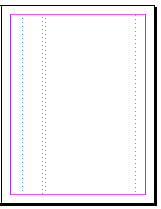
Each text frame on the master page has a First Baseline set to Leading (in the Text Frame Options dialog box). Now you can place the text in the right column, and a bunch of numbers in the left column. Where to get all those numbers? This post has a link to a file with a thousand or so numbers in it.
As long as the leading values in the two stories are the same, the numbers will line up with the lines of text.
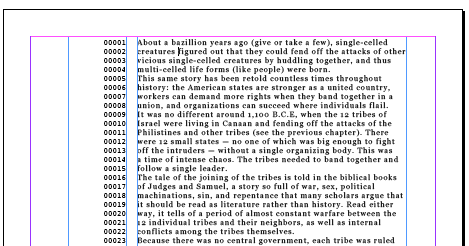
Obviously, this is limited because the leading isn’t always the same throughout a story (which will mess this system up). But I think it’s at least somewhat useful… until some enterprising plug-in developer comes up with a better solution!
 |
Yes, this kludge will work — except when it won’t. This is one more sad instance of InDesign lacking what I consider a totally obvious feature — and one which my XyWrite DOS word processor already had back in 1987: an inline counter. There are, ahem, countless uses for inline counters, so dear Adobe engineers — please give us that for CS4! Or: dear enterprising plugin developers — please give us that right now (for a modest price).
The info can also tell you the number of lines in your story, but I agree both this method and using a second frame are simply workarounds. Maybe CS17 will have a way to number lines.
“one which my XyWrite DOS word processor already had back in 1987”
Exactly, it’s a word processor feature, not a Layout program feature. InDesign is missing enough layout features that it doesn’t have to start working on adding word processor features.
I have to agree with Fred here. I can see how this would be useful to some people, but it’s not for the majority of users. Definitely a good one for a developer someday.
S.A. might check out InCopy and its galley view. That has real line numbering.
OK, Fred & David, you convinced me. I’ll now begin petitioning Adobe to remove InDesign’s spelling checker and Autocorrect for CS4 — such features are obviously word processor territory, and encroaching on domain that should probably even be forbidden by law.
Now, now, Klaus. Let’s be reasonable! ;) The point isn’t whether or not it belongs in one program or another. It’s a matter of how many people need that feature.
There is actually already splendid code in place in ID for a fine inline counter: the footnote numbering system (and, obviously, the Numbered List has such code, too). Alas, it’s not possible to 100% eliminate the footnote field at the bottom of a frame which contains footnotes — if I could only crack that nut, I’d have my inline counter, despite all your protests.
David, I don’t consider the “it’s a matter of how many people need that feature” to be much of an argument against the inclusion any feature. How many ID users use, say, the Data Merge capability? Say, 1 or 2%? Irrespective of the number of actual users, it’s a great feature to have in there. I haven’t, as of now, used it in real-world project myself — but I’m sure glad to know that Data Merge is doable, as it keeps my mind open to the possibility of taking on a project where that somewhat-obscure Data Merge feature would be the cat’s miaow. Since I have used the XyWrite inline counter, umm, countless time in the past, I KNOW how useful it is to have access to such a feature.
Hah! Major-League Triumphant Grins coming up here: :-) :-) :-) :-) :-) For I now tried setting the ParaStyle of the footnote to absolutely nothing — 0.1 pt and 0 leading — and, when eliminating the rule, that totally kills the footnote field, no matter how many reference numbers I put in the frame’s body text. Hence I have my InDesign inline counter!
Actually, I agree get rid of the auto correct and spell check ;)
Klaus, I thought you were just babbling earlier, but it finally dawned on me what you’re talking about! Okay, you get your “brilliant” gold star sticker for the day. For those who still aren’t picturing it, see this post.
Nice work on the inline counter!! This will be very useful.
Unless I’m missing something, though, this doesn’t solve the desire for a line counter does it? Am I missing something?
Good point, Mark. No, Klaus’ tip actually has nothing to do with line numbers. I think one just inspired the other. Line numbers still need to be done with the trick in the post above.
I really like the idea of adding a galley view to InDesign. I’m no engineer but I don’t see it being all that difficult.
While they’re at it, how about adding track changes? :)
This is a very good point — one that I hadn’t considered before: Do people want numbered lines just on screen? Or to actually print out in the document? I made the assumption in the post above that SA was talking about actually printing the numbers. But perhaps line numbers in a galley view would be adequate?
So how many lines of text can be typed on standard size paper?
Ella… umm… what’s a standard size? At what size? I can fit about 3,142 lines if I make the font size small enough.
Two years later…
If anyone still needs a script to add line numbers to an InDesign doc, here’s my implementation:
https://www.freelancebookdesign.com/?page_id=232
Thanks,
Ariel
Here is a free script for Line Numbering.
Totally needed this feature to finally free me from the hair pulling, swearing induced fits from trying to use the AWFUL program known as Microsoft Word for my transcription projects.
https://in-tools.com/article/scripts-blog/line-numbering/