


Quickly Add Line Numbers With This Free Script


Occasionally, I’ll read requests from users that for whatever reason need to have line numbers in their document.
Our friend Harbs at In-Tools has just posted a free script that does this quickly and easily on a page by page and style by style basis. The script is significantly different than InDesign’s built in numbering feature in that it numbers lines, not paragraphs. It works through the use of anchored objects and allows the user to choose which styles to add line numbers to. The anchored objects use object styles and numbers use paragraph styles making the look and feel quite simple to adjust.
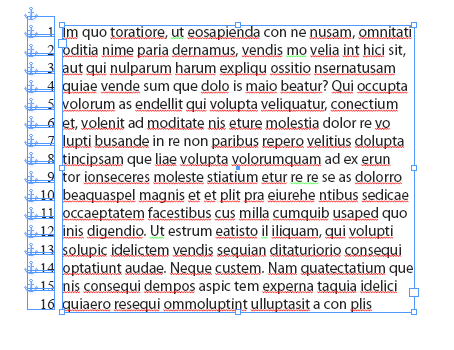
With hidden character displayed, the secret behind this script is revealed.
You can read more and download the script from this page on In-Tools website.
 |
Thanks Bob!
Lot of misspellings there … ;-)
Yeah…I forgot to apply the Klingon dictionary to the text. My bad! :)
A couple of issues to note:
1. It will break hyphenation because it injects the line number anchors at the start of each paragraph (which may be within a hyphenated word).
2. It’s a bit wonky for multi-column text frames. The default places the numbers to the left of the text frame (which creates overlapping numbers) and InDesign doesn’t support mirror placements (outside left for column 1; outside right for column 2).
3. You shouldn’t run the script multiple times on the same document as it doesn’t clean up the previously applied numbers first (which can result in duplicate/overlapping numbers).
@ Caleb,
Thanks for those! I’ll try to fix #1 and #3. I’m not sure what to do about #2…
Okay. #1 and #3 were fixed in version 1.0.1.
#2 is not really a bug — more a limitation of InDesign’s anchored objects…
Hi Bob,
For #2, you can apply different paragraph styles like Line Number (Column1) and Line Number (Column 2).
Additionally, I have two feedbacks on this tool:
(1) Giving option to the users to generate Line numbers for whole document, currently tool is running only in the active page
(2) Checking the possiblity to avoid the disturbances of line endings sometimes while adding/removing the line numbers
(3) Providing the option to the users to remove the Line numbers when they are not required, currently tool is removing Line numbers only when the Line numbers are already found during generation
Thanks,
ArcRaj.
Pl. read as object styles, not the paragraph styles mentioned in first para.
Here’s my implementation of adding line numbers.
Unlike Harb’s script, it simply adds a text frame alongside.
Don’t expect it to work with mutiple columns, though!
https://www.freelancebookdesign.com/?page_id=232
Thanks,
Ariel
The latest versions do work with mutiple columns…
Ariel
Hello everyone
Line Numbering Plugin for Adobe InDesign is available at https://store.eprinttools.in @ $10.
thanks
eprinttools
I’m very happy to discover this website. I wanted to tank you for your time due to
this fantastic read!! I derfinitely loved every part of it and
I have you book-marked to chec out new things on your web
site.
I want to change font face and size. Is it possible?