


Repeating Nested Styles in a Loop


Franck P. asked: Is there any way to find all the bullets in a paragraph and apply a character style without having to use find/change? Something automatic…
The answer can be found in nested styles, though it’s not immediately obvious how. Here’s an example of some text that he sent me:

Obviously, those little black round bullets have got to go. In CS2, you could create a nested style that would:
- apply no character style up to 1 bullet
- apply the character style through one character
- apply no character style up to 1 bullet
- apply the character style through one character
- apply no character style up to 1 bullet
- apply the character style through one character…
I think you get the idea. You do about 10 or so of these in a row (depending on the maximum number of bullets one might find in this kind of paragraph). It’s not fun, but it’s not terrible.
However, now in CS3, you can automate this quickly by adding a Repeat feature after the second rule:
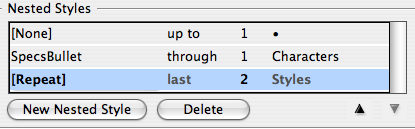
The fact that CS3 has a Repeat feature is easily overlooked, but it’s really helpful in this situation.
Of course, I first had to create a character style (which I called SpecsBullet) with the proper formatting. Originally, I was just applying a color to the bullet, but then I realized I just couldn’t stand looking at that insipid round bullet any longer. I just don’t like round bullets; I wanted a square bullet instead. I could have performed a find/change, but it seemed like cheating. Instead, I changed the definition of the SpecsBullet character style.
First I made the fill color None (which makes it disappear). Then I turned on Underline, and specced the underline as a 6-pt thick red solid line with a little negative offset to push it up into place. Here’s what I ended up with (after also changing the paragraph style’s font, color, and alignment):

You can also get some wacky effects by changing the underline style. For example, here’s what you get if you use Left Slant Hash, White Diamond, or Wavy lines instead:

Honestly, I’d probably rather use find/change to convert the bullets to the character I want, but it’s fun to see what you can do by formatting alone.
 |
“but then I realized I just couldn?t stand looking at that insipid round bullet any longer”
… maniac :)
Thanks a lot for showing me “repeat”.
Yeh, that was the first thing I noticed when I went to nest some more styles, I was thanking my lucky stars for the repeat feature.
– Create a picture frame and scale it down so it has the size of a Caps character
– Copy it
– Click inside the story
– Find/Change
– Find what : Bullet
– replace by what ? Change To > flyout menu > Other > Clipboard Contents
– OK
If the baseline shift of the inserted picture frame is not correct
– Select an inserted pic
– Copy
– in the Find what field, Paste : ~a appears
– in the Change field, apply the correct value for Baseline Shift in the Change Format option.
That’s it.
Branislav, yes, I love the ability to replace a bullet with an anchored object in CS3 (via the clipboard)! Of course, as I said, I was trying to create a custom effect without find/change. In my version, every bullet in this paragraph style would automatically be converted.