


Sorting Words and Paragraphs in a Glossary


Tom wrote:
I have been trying to find a way to do an alphabetical sort to produce a glossary of definitions. The project is a manual that has many procedures. We would like to place definitions from all of the procedures and place them in their own section. We have looked for a sorting feature but cannot find one.
While InDesign doesn’t have a sort feature built-in, it does come with a script called SortParagraphs.jsx. In CS2, you have to find this on your install disks or on the Web, but in CS3, it’s installed automatically. When you select some text and run the script, InDesign sorts each paragraph alphabetically.
But I think what you want goes even further than this. It sounds like you want a tool to grab certain words or phrases, then put them in a list alphabetically. My first thought was the Table of Contents feature, but that can only grab whole paragraphs (based on paragraph styles), not words (based on character styles). Then I found the answer: The Index palette.
You can tag words or phrases throughout your document with the Index palette by selecting the word and (when the Index palette is open… choose Window > Type & Tables > Index) and then pressing the New Index Entry button (or pressing Command/Ctrl-U). In the New Page Reference dialog box, choose Suppress Page Range from the Type pop-up menu. That way you’re just capturing the word/phrase and ignoring what page it’s on.

Later, after tagging all the words you want, press the Generate Index button in the palette and it creates one for you — alphabetized for your pleasure! — and loads it into the Place cursor. Next time you need to update it, just click Generate Index again!
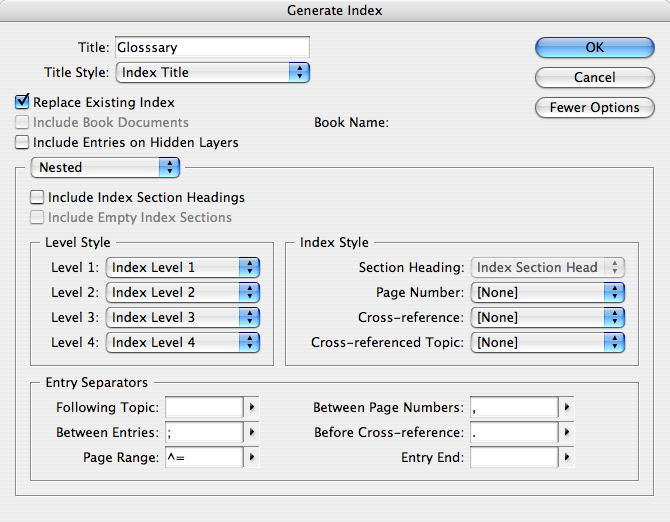
However, once you’ve made your list of terms, you’ll want to add the glossary definitions, right? And that’s where things can get messy. You can simply edit the index you made (it’s just a text story, after all), but if you later generate a new index, it will likely wipe out all your work. (Replacing the old index is an option when generating an index, but it’s easily overlooked.)
So what I would suggest is to duplicate the text frame with the index (or copy and paste the story into a new frame). Your duplicate is not linked to the original index, so it’s not wiped out when you generate a new index. However, your edited glossary is obviously no longer going to stay updated with the rest of the document. So it’s not a perfect solution.
(By the way, CS3 5.0 definitely has some problems with indexing multiple documents in a book. I know that Adobe is aware of the problem and they’re trying to fix it. Perhaps a 5.01 will come soon! I hope so. More on this in a separate post.)
 |
Use the same technique you use for an advertiser index. Put the terms and glossary definitions on a separate, nonprinting layer (as nonprinting objects)
My problem with this: CS2 doesn’t always get the alphabetical order right. The proper placement of one entry seems to depend on the presence or absence of nearby entries. I haven’t been able to figure out the pattern.
Just wanted to say thanks for the tip – you saved me alot of time!
Please keep in mind that InDesign sorts wrong!
For example: “99-abc” is sorted before “100-abc”. (Don’t tell me that you really want this.)
And don’t expect characters beyond A-Z to be sorted correctly in every case.
In order to sort _correctly_ following the Unicode vaalues (i.e. the usual alphabet), you’ll need, for example, a script. I am just hunting for one that does this job.
By the way: this is not the only bug in Indesign’s “Index” function …
OK – here is how I do it:
1. Make the index with InDesign’s index function;
2. copy + paste the text into Word;
3. Table -> Sort -> as Text
4. copy + paste to InDesign
Cheers,
Rudi
you are a genius, thank you so much that worked a treat, saved me a lot time trying to figure this out
If ongoing sortability is an important factor in the design of your glossary, I think this will help. There’s a certain amount of set-up involved, so it may not be worth it unless you have a large glossary or need to keep adding definitions to it and re-sort.
Put the glossary terms as a list in one text box. This is the list that you will sort. Place the definitions in their own text boxes, anchoring them to the term in the glossary terms list, using Object>Anchored Object>Insert… to anchor the definition text box to the glossary term’s text.
Now, when you want to re-sort your glossary, use the sorting script mentioned above to sort the terms list, and the definition boxes will follow.
I’ve just tested this idea, and it works. Now I’m figuring out how to streamline the process of creating the definition text boxes, possibly with another script.
Just like to add this link to the discussion because Peter Kahrel’s script goes far beyond SortParagraphs.jsx – it sorts diacriticals correctly and much more:
https://www.kahrel.plus.com/indesign/sort.html
Great!