


Store Live Captions in libraries


Frans van der Geest sent us the idea for this tip, which he’s written up on his blog. But his blog is a little hard to follow if you don’t read Dutch! So here’s an English version, with a twist:
The new Live Caption feature of InDesign CS5 is a fantastic way to create automatic captions from image metadata, but it can be a bit of a hassle to set up. You can make using Live Captions much easier by storing them in InDesign Libraries or saving them as Snippets. Here’s how:
I’ve got several images where I’ve entered metadata into the Author and Description fields using Adobe Bridge, like so:

1. In InDesign use Object > Captions > Caption Setup to configure a caption:
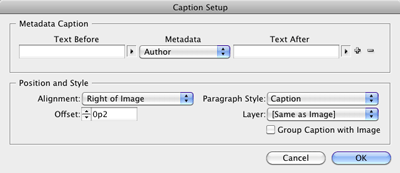
2. Then apply the caption to any photo by choosing Object > Captions > Generate Live Caption.
3. Select the resulting Caption frame, and drag it into an InDesign Library, or drag it into the new MiniBridge panel to create a Snippet.
4. Repeat steps 1-3 to create another caption, this time using the Description metadata field, and drag the resulting Caption frame into an InDesign Library or create a Snippet.
Now, when you have another image that you want to add a caption to, just drag your caption Library item or Snippet onto the page. The text in the frame will display “<No intersecting link>”. But when you position the text frame so it touches your image (Smart Guides makes this easy), the Live Caption feature automatically updates the text in the caption frame. Magic!


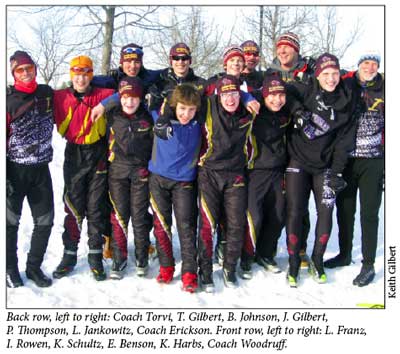
You may notice that if you have a lengthy caption, and you use the Live Caption feature, that the caption doesn’t wrap, and you end up with something like this:

This happens because Live Captions use Text Variables technology, and Text Variables can’t wrap in InDesign. The workaround is to select the caption frame, and choose Object > Captions > Convert to Static Caption, and the text will then wrap properly. You will need to vertically resize the text frame to see the additional line of text.
 |
For Dutch readers, my original Dutch blogpost is here:
https://fvdgeest-dtp.blogspot.com/2010/05/cs5-captionsbijschriften-en-een.html
I’m under the impression that you can write a caption for an image in Photoshop, using file info, and import that information in InDesign. This will help me in my newsletter, which I take photos for and design. No more copy and paste.
You can write a caption for an image in Photoshop’s File Info (like Keith shows) or in Bridge’s metatdata panel.
Either place, don’t bother looking for a “caption” field because that would make sense. Instead, look for the “description” field and write your caption there.
One other cool thing about live captions is that you if you don’t want the caption right next to the image, but you do want to keep it “live,” then you can put the caption frame anywhere on the spread and then just group it with the image.
Why should it be so much easier to type a caption in the metadata than in the actual document. Especially when you have to change the date as in the sample above AND don’t get text wrap to boot? You then have to go static anyway.
Even if you use the same image two or three times.
I sometimes wonder about the real benefits of “automatisation”.
The real benefit is that if you have one person supplying the pictures and captions and another laying them out, the person supplying the pictures can supply the caption in the same file as the picture rather than in a separate text file of captions to be cut and pasted. This means there’s no danger of accidentally mixing up the captions and associating them with the wrong pictures, as well as making life easier for the person laying them out.
I agree though that if the metadata isn’t already present in the picture when you get it, it’s more work for you as a typesetter, not less.
Here’s an obscure tip with Live Captions.
If you want to create live captions that are located away from the image you can draw a 0pt line between image and textframe and group the three.
Here’s a short vid on it on Youtube. https://bit.ly/cvCilZ
rgds
/Mattias
https://twitter.com/mjonsson
Swedish Blog: https://mjonsson.me
Hi Mattias, thanks for the tip! But you don’t need the connector line, you can just group the caption and the picture (see my previous comment). Or maybe the Swedish version works differently? ;-)
So, finally got around to trying this live captions thing and after a fair bit of playing around managed to get it working (if only I could figure out how to get InDesign to automatically update modified links I would not have had to pull my hair out).
I’ve now ditched the idea, though, because I can’t use italics in metadata. I’m not about to edit the metadata file with tags or such. A waste of my time.
I am with you Glen. I tried assigning paragraph styles, nested styles, and even GREP styles but nothing affected the italics on the text. This seems like a major flaw in a program that allows users to format nearly everything.
Actually, you can set the format of the caption to anything you’d like.
Just define a named paragraph style for the caption, and the select that style in the Paragraph Style dropdown of Caption Setup.
Caption Setup is also where you can set grouping of image and caption to be automatic, and the gap you’d like between the caption and the image, among other useful things.
If you have captions already made, you can click in the text and set the Paragraph Style directly, in the normal way for text.
Can you create ‘live captions’ for images in table cells?
@Claire: Because the Live Captions feature doesn’t work with inline or anchored graphics, it won’t work with images in table cells either, since images in table cells are inline graphics.
Does anyone know if there is some way of using different Paragraph Styles within the live caption. So that one could have a separate style for Author, camera, lens etc? It seems to me to be able to only apply 1 paragraph style – has anyone discovered a workaround?
@Marc: This would be a good feature request to make at https://adobe.ly/pt7zGa and https://bit.ly/nHjWOq. This could also be automated by scripting.
I have found that using CS5 autonumbering in my Figure caption stylesheet causes my captions to crash and corrupt my InDesign document. Any workarounds to this?? It’s very frustrating. I’ve tried loading para styles from non-corrupt documents and it doesn’t work either.