


SVG Import and Export Means Better ePubs


First some background: SVG (“scalable vector graphics”) is a simple but powerful way to save vector artwork (like text and logos and line art or graphics made in Illustrator). Adobe was one of the first companies to push SVG. I even wrote an article in Adobe Magazine back in the ’90s about it. I thought for sure SVG was the future of vector graphics.
Then Microsoft decided it didn’t want to support it any longer and SVG basically withered. Adobe kept flogging it for a bit — you can still get SVG out of Illustrator, and InDesign could even export SVG up until CS2 or CS4 — but it was hardly any use. Everyone seemed to care more about Flash or Silverlight or PDF.
But a funny thing happened on the way to the forum… ePub.
While Adobe’s Digital Editions software supports Flash, a number of other epub readers don’t. LIke, um, most of them, including iBooks on the iPad. So what is an epub publisher to do with vector graphics? Usually, they just get rasterized (turned into bitmaps), which is pretty icky. Or, you can hand code a link to SVG into epub, which is even ickier.
But check this out: A third-party developer has recently come up with a way to let InDesign import SVG files: svg.scand.com.
I have only played with their demo, but it’s cool enough that I wanted to let you all know about it. Currently, the Mac version isn’t working properly for me (I think the installer is broken), but the Windows version seems to work just fine.
To import an SVG file, you have to change the Format pop-up menu in the Place dialog box to All Files or “Scalable Vector Graphics,” or else InDesign won’t see it. But after that, it acts just like a regular graphic.
Then — and this is important — when it comes time to export your ePub file, you have to change the Copy Image pop-up menu from Formatted to Original:
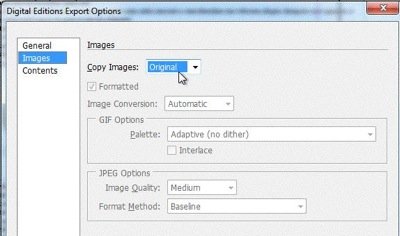
That way, the original SVG file is placed into the ePub, instead of a rasterized JPG or GIF.
Of course, the ability to use SVG will be welcome to even some folks who aren’t doing ePub — they just have a bunch of SVG images. That’s fine, too!
Try out the SVG Kit plug-in and let me (and them) know what you think about it in the comments below! Does this version (currently 1.0) work for you? Is it worth the price (currently $99 for 1 license)? Is this something you have wanted?
 |
Won’t install on Mac (10.6.4) for me either. Error says installer can’t find installed copies of ID or PS. Sent a note to company.
I discovered (with the company’s help) that the installer does appear to install the Mac CS4 version here: computer/library/Scand ltd/SVG for Creative Suite/cs4. It works really quite well… and on the Mac, you can just “Place” like any normal image (you don’t have to adjust the Format pop-up menu).
Blatner: InDesign could even export SVG up until CS2 or CS4
SVG exporting options are available in CS3. They are not present in CS4.
Thank you, Miguel. I was typing too quickly. I meant “up until CS2 or CS3.” That darn “4” is just too close to the “3”!
An updated installer for Mac is now on Scand’s website; it now installs to ID and PS CS5 without a hitch. DMG file is here.
Beware! Bridge does not display thumbnails/previews for SVG files. They all show up as the same SVG icon.
My new employer uses SVG images in a web app. They have tons of SVG assets, and I’m stuck for a way to scan through them!
Any help out there?
I have just discovered that not all ereaders support svg graphics – in particular the Kindle!
Seems developers read your comment ;-)
I see the new version Mac and win are available, with Bridge support.
Wow, thanks Victor! I’m glad development keeps rolling on this product. (Readers please note that those links in Vik’s comment are direct links to dmg and exe downloads.)
Hi David. I had installed this for an epub I did last year and now opening the epub for updates to do for the client, the plug in is out of date and needs a new install. Which is fine but I don’t know where to put the file once I download the trial version for the website (for windows) Can you help, please?