

InDesignSecrets Podcast 183
Listen in your browser: InDesignSecrets-183.mp3 (17.1 MB, 32:02 minutes)
[media id=104 width=* height=20]
See the Show Notes for links mentioned in this episode.
Or view the transcript of this podcast.
- News:
- Milestone: 2,000 blogposts!
- Erica Gamet’s ID Power Pack
- New version of Export to Kindle plug-in
- Creative Cloud Education discount
- Teacup Software’s new 2D barcodes
- EmSoftware Wordsflow
- Five MORE Overlooked and Lonely InDesign Features (Autocorrect anyone?)
- Another “InDesign Horror Story” (née “Training Client from Hell”)
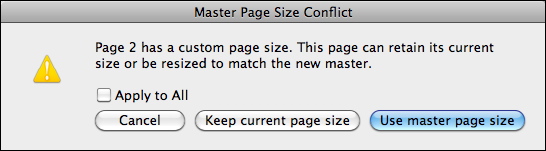
- Obscure InDesign Feature of the Week: Use Master Page Size
News and special offers from our sponsors:
>> Mag+ (magplus.com) is an efficient and affordable digital publishing platform to create apps for tablet devices straight from InDesign. In the latest version (4.0), you can now publish to Smartphones as well –including iPhone 5. The Mag+ tools are FREE to download from their website, and work with CS4, CS5 and CS6. You can use the bundled InDesign templates, and take advantage of their innovative Review button to quickly see fully-functional touchscreen previews. For more information go to www.magplus.com.
>> Rorohiko’s StoryTweaker ($99) plug-in lets editors and writers access your InDesign file’s text without needing to own InDesign or InCopy. The plug-in is associated with one InDesign seat, but allows that user to create an unlimited number of AssignmentTweaker sets, which is what the editors open and work on. The workflow is spelled out on the StoryTweaker site, and there’s a 20-day free trial available. Special for InDesignSecrets listeners.
–
We still want to hear your stories! Send us a short (less than 1 minute) “InDesign doc/client/user Horror Story” that we can play on the air (you’ll be anonymous) in an upcoming episode: leave us a voice message at +1-801-459-4477 to record it, or send in your own voice recording. Please follow-up with an e-mail, which we will keep private, including any additional information that you’d like us to know. You’ll get a nifty gifty from us if we play it in a podcast!
–
> Teachers and students get 1 yr of Creative Cloud for $19.99/mo if they sign up by Nov 4, 2012!
> Erica Gamet’s new ID Power Pack, enter IDS50 discount code for 50% off!
> Amazon’s Kindle Plug-in for InDesign v0.972 (beta, still!)
> Teacup Software’s new 2D barcodes in latest version of their BarCodeMaker
> For a free QR Code Maker plugin, check out the offer from Meadows
> EmSoftware has a new WordsFlow plugin for InDesign
> Overlooked features: Listen to podcast 182 for the first 5
> Posts about these features: Autocorrect, Place and Link, Slug, Discretionary Hyphen, (nothing on Split Window yet)
> Post about David’s issue during the podcast, Rebuilding Prefs
Couple of screen shots that you’ll find interesting:
From the Export to Kindle plug-in, note the IDML option!
and, here’s the dialog box containing the Obscure InDesign Feature of the Week:


You guys used my “horror story”!
I could tell so many more horror stories about this particular InDesign user. She is nearly computer-illiterate, yet she is in charge of doing a lot of work using ID, Photoshop, Illustrator, etc.
Another quick story about her: she was creating an auction program for a client not long ago. It was 20 pages. She had the whole thing laid out and was nearing completion, when the client told her: I decided I don’t want hyphenation.
I heard her sighing and cursing under her breath about it, so a few minutes later I walked over and asked her what was wrong. She said: “I’m having to go through and take out all of the hyphens.” My eyes glazed over. I said: “No, just open up your Body paragraph style and uncheck the ‘hyphenate’ box.” She looked at me like I was speaking Cantonese. “I don’t have a Body paragraph style.” (At this point, I remembered that she doesn’t use styles.) So… I thought for a moment and said: “Ok, do this. Click 4 times somewhere in your body copy. That will select ALL of your text. Then open the Paragraph panel and uncheck the ‘hyphenate’ box.” She hesitated, then did what I said… but the hyphens didn’t go away.
…and THAT was when I realized that she had manually put her own hyphens all over the document.
So… I confirmed to her… “Yes, you’re right. Getting rid of those hyphens IS going to be a pain in the butt. Good luck with that!”
Just another quickie about her… because working with her is pretty entertaining…
Her computer gets viruses and spyware on a pretty regular basis, which of course means IT needs to fix it. I’ve sat at her desk, watching her use the internet, and it’s easy to see how she gets so much malware. I’ll say: “Go to YouTube and search for a video about flyfishing (or whatever)”… she will go through the following routine:
She’ll open Internet Explorer. The first thing I notice about her Internet Explorer is that it has a stack of toolbars at the top, about 2 vertical inches of them.
Next, she’ll locate the Yahoo search toolbar.
Then, she’ll type “G-O-O-G-L-E” into the Yahoo search bar. (Yes, she Yahoos Google. That seems like it could potentially break the entire internet, and possibly even disrupt the universe’s spacetime continuum.)
She will get a list of results, and she’ll click the top one, Google.
In the Google search window, she’ll type “YouTube flyfishing.”
She’ll get a list of results, including some sponsored results at the top of the list. She will click on the top link, no matter what it is. It may be an actual video on YouTube, or it may be a link that will install yet another toolbar on her Internet Explorer (perhaps a Flyfishing toolbar.)
Several of us here at the office have watched her go through this routine. We are all entertained by it. Several of us have tried educating her on how to use the internet properly, but… she doesn’t respond to correction.
Christopher! I laughed so loud I scared the dog … rofl. Thank you! Bless her heart … it sounds like my Mom, who’s valiantly trying to keep up w/the times at 76 yrs old and after 2 years of using a Mac I gave her still doesn’t know what a “window” is or how to go to a web site. (She types web addresses in the Google search field, which sort of works.)
Please send us (info@indesignsecrets.com) your email address so we can send you a little giftie. :D
There are two people in these stories. The ‘co-worker’ who is ‘computer illiterate’, and incompetent in the style of a fairy story; and the story teller, who has now three times held her up to ridicule, and who (apparently) never does anything idiotic himself.
Which one would you rather work with ?
(Clue: The ‘co-’ in co-worker is not supposed to stand for ‘completely untrustworthy’.)
@Peter: You make a really good point… we need to say this really clearly: WE ALL MAKE STUPID MISTAKES SOMETIMES, and none of us knows everything about InDesign or anything. I’m learning new stuff all the time. That’s why I particularly liked the horror story in this podcast — I didn’t even realize you could do that!
So we must share these kinds of stories with humility. We don’t mean to be mean. But that said, we all know someone (mother, colleague, or ourselves) that did or asked something so egregious that we had to at least vent about it a little.
I’d prefer to hear more stories like this one :P http://indesignsecrets.com/merging-two-tables-together-in-indesign.php
It was a great roundabout solution – but there ‘s an easier way :P